Shala Darpan Login: Staff, Student and Parent Services on Rajasthan’s School Portal
How Shala Darpan login works on Rajasthan's Integrated Shala Darpan portal — the staff window, school login, what parents can see without an account, and how it differs from the KVS Shaala Darpan.
Rajasthan runs its government school system on one database, and Shala Darpan is the window into it. Staff service records, student enrolment, daily attendance, transfer requests, result entry, progress reports, scholarship and DBT payments — all of it is entered, checked and published through the Integrated Shala Darpan portal at rajshaladarpan.rajasthan.gov.in.
Most people arrive looking for one specific thing: the login box. But “Shala Darpan login” means different doors for different people, and a fair number of visitors need no login at all. There is also a genuine name clash — the Kendriya Vidyalaya system runs its own platform called Shaala Darpan, which has nothing to do with Rajasthan. This guide sorts out which is which, then walks through signing in, registering, what the portal actually does, and what to try when it refuses you.
What Shala Darpan Is and Who Should Use It
Integrated Shala Darpan belongs to the School Education Department, Government of Rajasthan, and is operated with the Rajasthan Council of School Education in Jaipur. It was built as a school management and monitoring system covering the state’s government schools — their students, their staff, their infrastructure and their day-to-day academic activity. The official address is rajshaladarpan.rajasthan.gov.in, and the portal’s own disclaimer names the department as its owner.
Around the core system sits a family of linked modules on the same domain — student admission, internship allotment, Class 5 and Class 8 board examinations and results, the national means-cum-merit scholarship module, a sports module, a DBT common login, Shala Samvad for students, and dashboards run through the state’s Vidya Samiksha Kendra. Related portals sit alongside it: Samagra Shiksha at rajsmsa.nic.in, the Private School Portal at rajpsp.nic.in, the Gyan Sankalp donation portal, and a Sanskrit education section.
Now the important distinction. If your child studies in a Kendriya Vidyalaya, this is not your portal. Kendriya Vidyalaya Sangathan runs its own e-governance platform, also spelled Shaala Darpan, at darpan.kvs.gov.in, for the Kendriya Vidyalayas it administers nationwide. It is a separate organisation, a separate database and a separate login — a KV parent or teacher will find nothing about their school on the Rajasthan site, and a Rajasthan government-school teacher has no account on the KVS one. The two share a name and a broad purpose, nothing else. Similar deployments exist in other centrally run school systems, so always check the domain in your address bar before you type a password.
Within Rajasthan, the users are:
- Government school teachers and non-teaching staff — individual accounts through the Staff Window.
- School heads and office users — institution-level accounts at block, district and state offices, through School/Office Login.
- Students and parents — no personal password. Public information is available through the open sections of the site.
How to Log In, Step by Step
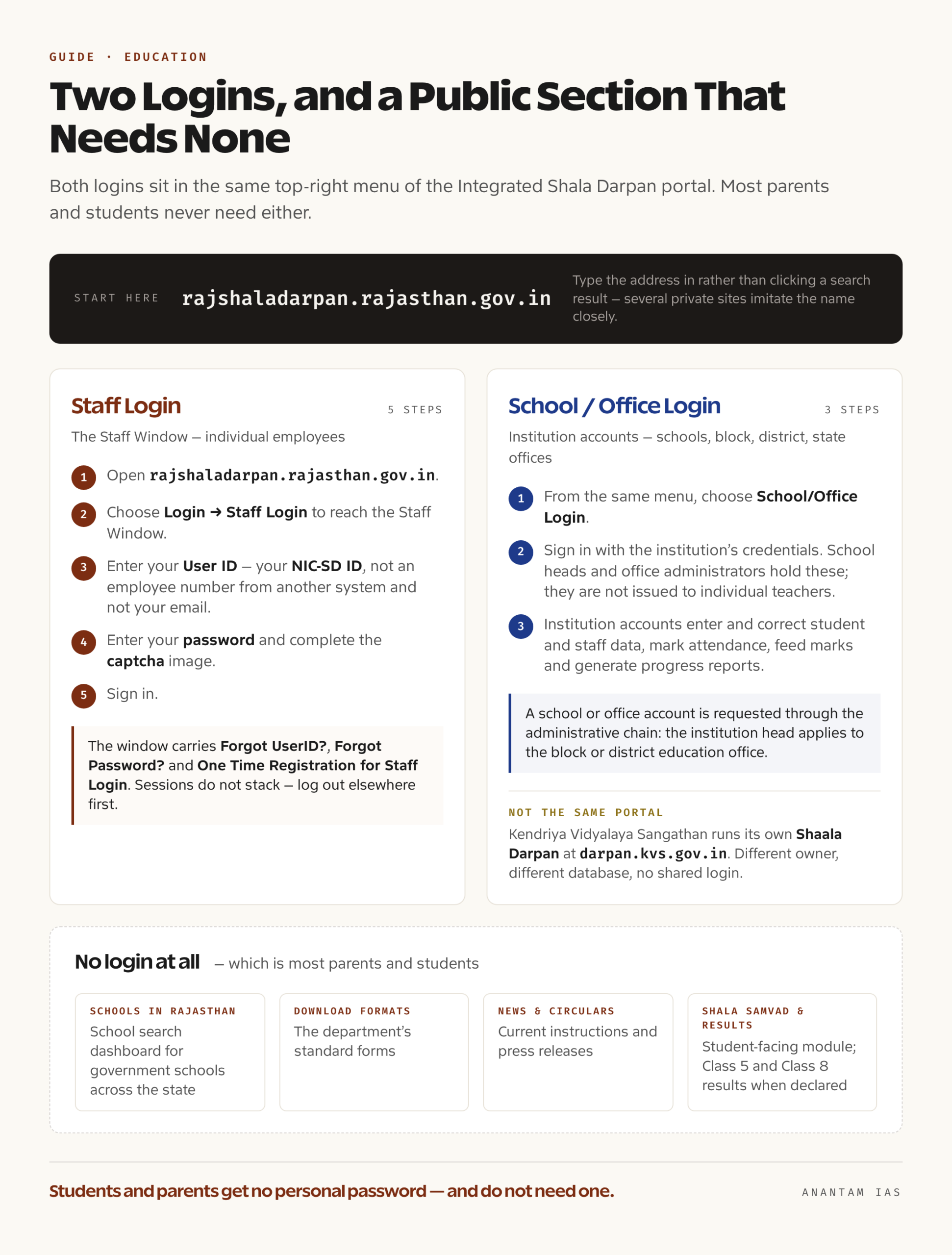
The portal keeps its two logins in the same top-right menu, labelled School/Office Login and Staff Login.
Staff Window — for individual employees:
- Open rajshaladarpan.rajasthan.gov.in. Type it in rather than clicking a search result; several private sites imitate the name closely.
- Choose Login → Staff Login to reach the Staff Window.
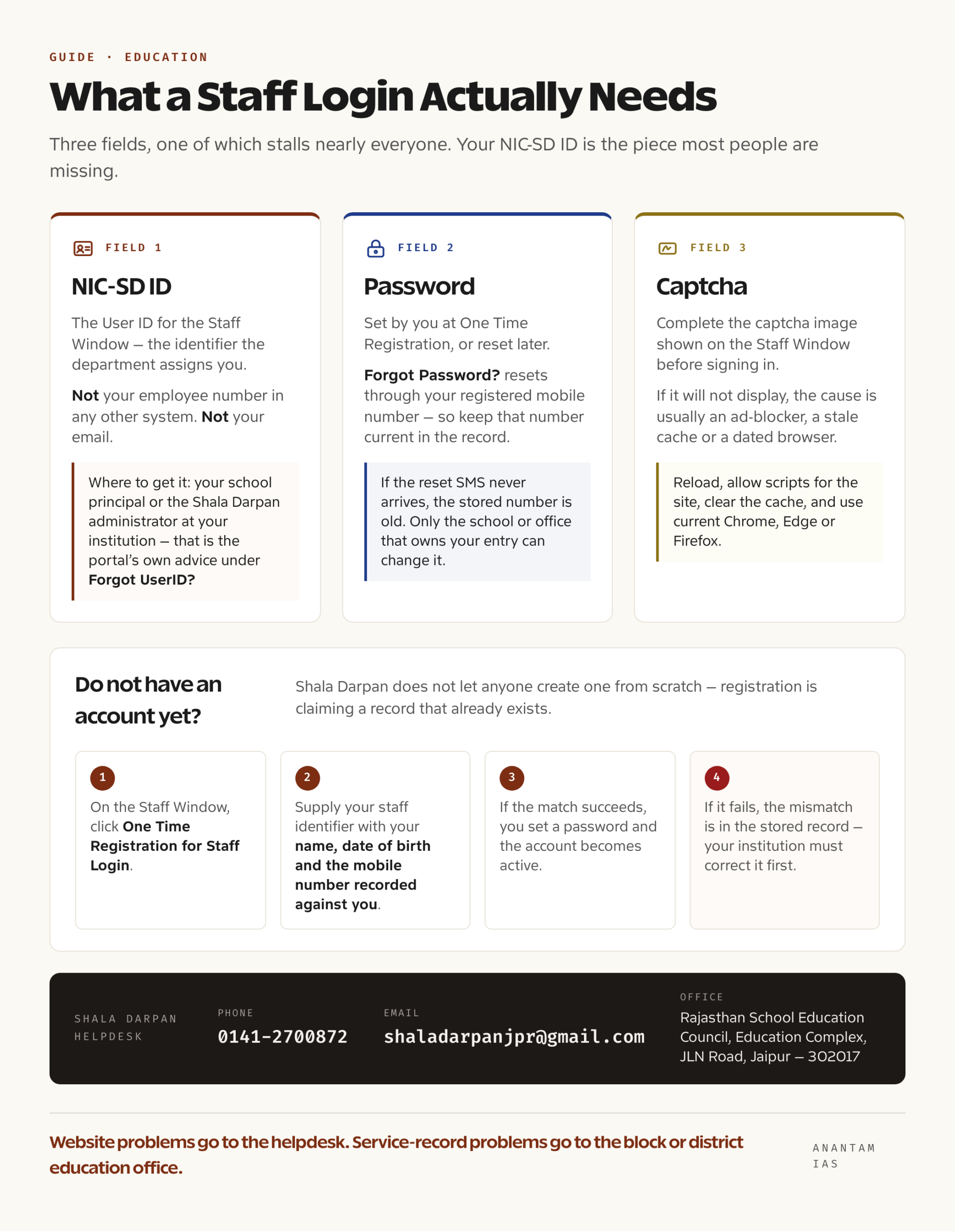
- Enter your User ID. This is your NIC-SD ID, the identifier the department assigns you — not your employee number in any other system and not your email.
- Enter your password and complete the captcha image.
- Sign in.
The Staff Window carries three self-service links you should know before you need them: Forgot UserID?, Forgot Password?, and One Time Registration for Staff Login. The portal also puts up a plain-spoken warning that if you are already logged in elsewhere you must log out or close the browser before signing in again — sessions do not stack.
School/Office Login — for institutions:
- From the same menu, choose School/Office Login.
- Sign in with the institution’s credentials. School heads and office administrators hold these; they are not issued to individual teachers.
- Institution accounts are the ones that can enter and correct student and staff data, mark attendance, feed marks and generate progress reports.
And if you have no login at all — which is most parents and students — go to the open sections instead. Schools in Rajasthan opens a school search dashboard covering government schools across the state. Download Formats carries the department’s standard forms. Shala Darpan and the news, circular and press-release panels publish current instructions. The Shala Samvad module is the student-facing space, and Class 5 and Class 8 examination results are published on the portal’s own results pages when a session’s results are declared.
Registering for the First Time
Shala Darpan does not let anyone create an account from scratch. Your identity already exists in the department’s database; registration is the act of claiming it.
For staff, the route is One Time Registration for Staff Login:
- On the Staff Window, click One Time Registration for Staff Login.
- Supply your staff identifier along with your name, date of birth and the mobile number recorded against you in the department’s records. The system matches what you type against the record it already holds.
- If the match succeeds, you set a password and your Staff Window account becomes active.
- If it fails, the mismatch is in the stored record — usually a date of birth or a stale mobile number — and it has to be corrected by your institution before registration will go through.
Getting your NIC-SD ID. This is the step that stalls people. The ID is issued by the department and held by your school; the portal’s own guidance on Forgot UserID? is to obtain the NIC-SD ID from your school principal or the Shala Darpan administrator at your institution. The Staff section of the portal also carries open lookups for staff and school identifiers, so it is worth checking there before making a phone call.
For a school or office account, the request goes through the administrative chain rather than a form: the institution head applies to the block or district education office, which is responsible for institution mapping on the portal.
Two housekeeping points that matter more than they sound. First, keep your mobile number current in the record — every recovery flow on the portal ends at that number, so a stale one turns a two-minute reset into a week of paperwork. Second, staff details are periodically required to be updated through the department’s prescribed personnel format; the portal announces these updation deadlines in the scrolling notice bar on the home page, and missing one can freeze parts of your record.
Key Services on the Dashboard
| Area | What it covers | Who uses it |
|---|---|---|
| Staff service record | Personal and service details, the prescribed personnel format, postings | Staff, through the Staff Window |
| Attendance | Daily online attendance for both students and staff, which the department has pushed towards full online coverage | Schools |
| Student records | Admission, enrolment, class and section data, transfers | Schools, through the student admission module |
| Examinations and results | Marks feeding for board and non-board classes, Class 5 and Class 8 examinations, result entry within published deadlines | Schools |
| Progress reports | Download, verify and print the holistic progress report and marksheets for pre-primary, Classes 1-4, 6, 7, 9 and 11 | Schools; parents receive the printed output |
| Transfers | Transfer schedule and transfer orders published through the Staff section | Staff |
| Internship | Internship allotment for trainee teachers | Institutions and interns |
| Scholarships and DBT | The national means-cum-merit module and the DBT common login | Schools and sanctioning offices |
| School search | A public directory of schools across Rajasthan | Anyone, no login |
| Shala Samvad | The student-facing module on the portal | Students |
| Monitoring | State dashboards through the Vidya Samiksha Kendra | Department and offices |
There is also a mobile app published by the department for school monitoring, which reads from the same database rather than creating a second account.
Common Login Problems and How to Fix Them
| Problem | Likely cause | What to do |
|---|---|---|
| “Invalid user ID” | Using an employee number from another system instead of the NIC-SD ID | Use Forgot UserID?, or get the NIC-SD ID from your principal or the school’s Shala Darpan administrator |
| Password not working | Forgotten, or never set after a record update | Use Forgot Password?, which resets through your registered mobile number |
| One Time Registration fails to match | Date of birth, name spelling or mobile number differs from the stored record | Have the institution correct the record first; the portal will only match what it already holds |
| Reset SMS never arrives | Old mobile number in the record | The number has to be updated by the school or office that owns your entry — no self-service route works around it |
| “Already logged in” message | An open session elsewhere | Log out fully or close the browser, then sign in again, as the Staff Window itself instructs |
| Captcha will not display | Ad-blocker, stale cache, dated browser | Reload, allow scripts for the site, clear the cache, use current Chrome, Edge or Firefox |
| Portal slow or unreachable | Peak load around updation and result-entry deadlines, or a scheduled maintenance window announced on the home page | Work outside deadline days; check the scrolling notices before assuming a fault |
| Your data on the portal is wrong | The entry belongs to the school or office, not to you | Get the institution to correct it; staff cannot overwrite verified fields themselves |
When the self-service links run out, the department publishes a Shala Darpan helpdesk: 0141-2700872, email [email protected], at the Rajasthan School Education Council, Education Complex, JLN Road, Jaipur — 302017. Working hours apply, so call on a weekday morning. For anything involving your service record rather than the website, the block or district education office is the office with the authority to fix it.
FAQ
Is there a student or parent login on Shala Darpan? No individual password is issued to students or parents on the Rajasthan portal. What is open to everyone is the school search directory, the department’s downloadable formats, circulars and notices, published examination results, and the Shala Samvad student module. Progress reports and marksheets are generated by the school and given to parents.
What is the NIC-SD ID and where do I find it? It is the user ID for the Staff Window, assigned by the department. The portal’s own advice on the Forgot UserID? link is to obtain it from your school principal or the Shala Darpan administrator at your institution.
How do I register for staff login the first time? Open the Staff Window and use One Time Registration for Staff Login, then enter your staff identifier along with your name, date of birth and registered mobile number. The system matches those against your existing record before letting you set a password.
Is Rajasthan’s Shala Darpan the same as the KVS Shaala Darpan? No. Rajasthan’s Integrated Shala Darpan at rajshaladarpan.rajasthan.gov.in serves the state’s government schools. Kendriya Vidyalaya Sangathan runs a separately administered platform of the same name at darpan.kvs.gov.in for Kendriya Vidyalayas. Different owners, different databases, no shared login.
What is the difference between School Login and Staff Login? School or Office Login is an institution account held by the school head or an office administrator, and it is the account that enters and corrects student and staff data. Staff Login is a personal account through the Staff Window, used by an individual employee to see and update their own record.
Whom do I contact if the portal has wrong information about me? Data corrections are made by the office that entered them — normally your school, then the block or district education office. Use the Shala Darpan helpdesk on 0141-2700872 or [email protected] for problems with the website itself.