मध्य प्रदेश का सरकारी school system एक web platform पर चलता है। Teacher postings, salary records, guest-faculty vacancies, student enrolment, scholarship payments, मुफ़्त textbooks और uniforms, hostel applications, इन सबके पीछे का paperwork अब Education Portal 3.0 में है। यह School Education Department का current-generation portal educationportal3.in है।
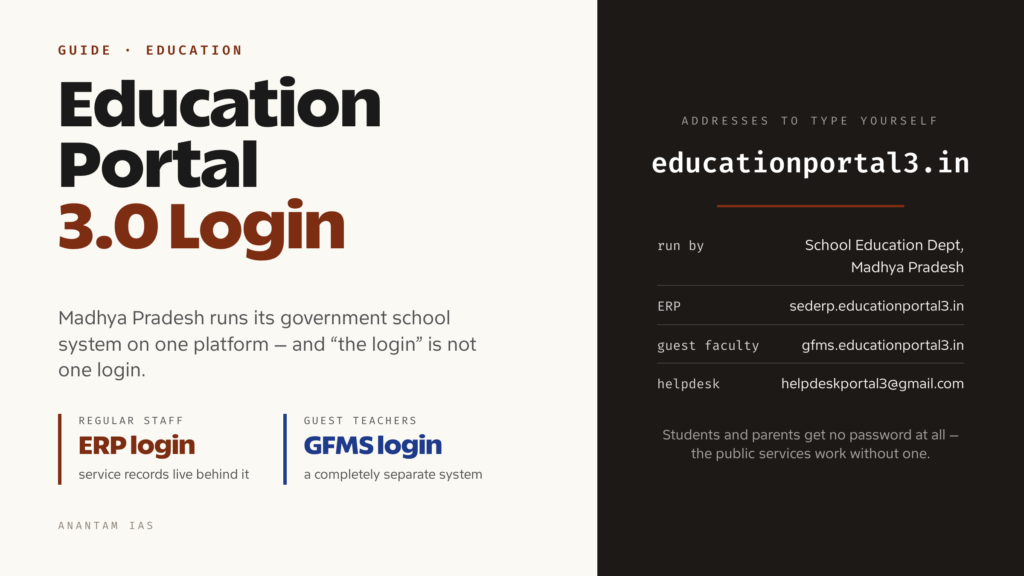
उलझन यह है कि “Education Portal 3.0 login” कोई एक login नहीं है। Regular departmental staff और guest teachers के अलग sign-in doors हैं और बड़ा public section ऐसा है जिसमें password की ज़रूरत नहीं। पहली कोशिश में सही door चुन लेने से ज़्यादातर परेशानी बच जाती है। यह guide portal, अलग-अलग logins, sign in और registration, account के अंदर मिलने वाली services और login box पर रुकने वाली errors का हल बताती है।
Education Portal 3.0 क्या है और किसे इस्तेमाल करना चाहिए
Education Portal 3.0 मध्य प्रदेश सरकार के School Education Department का है। यह department का अपना administrative system है, जहाँ राज्य के सरकारी schools का data, staff records और scheme payments दर्ज और monitor किए जाते हैं। Home address educationportal3.in है। Site पर DPI, Rajya Shiksha Kendra, CM Rise, RMSA और tribal wing के live circulars, appointment orders तथा recruitment notices के साथ district और block office notices भी आते हैं।
यह department के पुराने Education Portal 2.0 और Shiksha Portal generation के बाद आया है। नाम का “3.0” department का अपना version label है, किसी coaching site का बनाया nickname नहीं। Search में “mpeducationportal3” और “theeducationportal3” जैसे private websites ऊपर आ सकते हैं और official दिख सकते हैं। वे department के नहीं हैं। Address खुद type करें और जिस site का address आपने खुद नहीं लिखा, वहाँ password न डालें।
किसे login चाहिए और कौन-सा:
- Regular departmental staff — teachers, principals, clerks और block या district office staff। इनका sign-in ERP login sederp.educationportal3.in से होता है। Service record से जुड़ी सारी चीज़ें यहीं हैं।
- Guest teachers (अतिथि शिक्षक) — academic session के लिए खाली पदों पर रखे गए लोग। इनका अलग Guest Faculty Management System gfms.educationportal3.in पर है। ERP user name से GFMS नहीं खुलेगा और GFMS ID से ERP नहीं खुलेगा।
- Outsourced teaching staff अलग Project Outsource Management System (POMS) इस्तेमाल करते हैं। इसके credentials ERP और GFMS से अलग हैं।
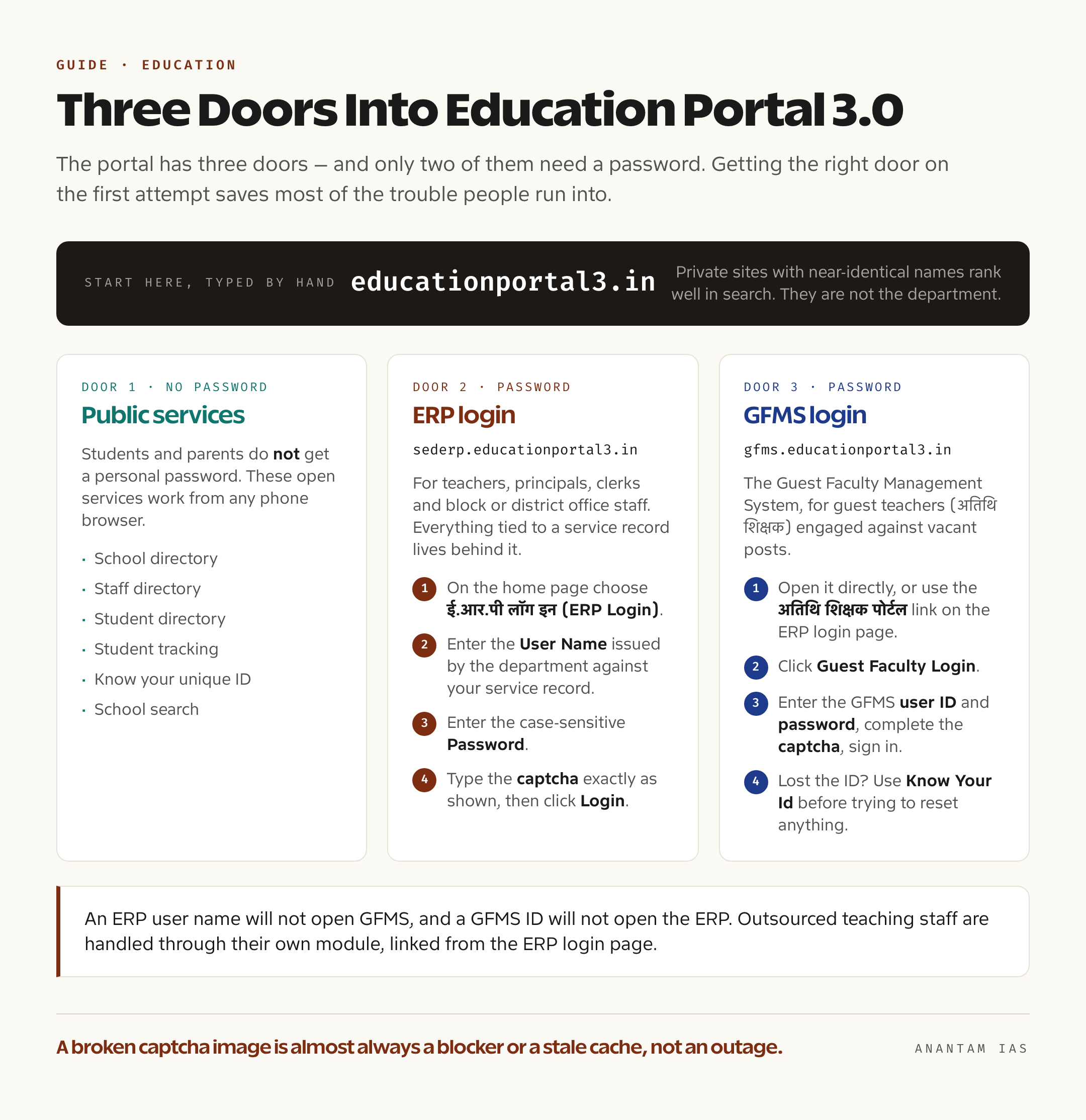
Students और parents को personal password नहीं मिलता। Student login की उम्मीद लेकर आने वालों को यह अजीब लग सकता है। Department मुख्य portal पर बिना login वाली services देता है: school directory, staff directory, student directory, student tracking, “know your unique ID” और school search। Phone browser से कोई भी इन्हें account के बिना इस्तेमाल कर सकता है।
Login कैसे करें, चरण-दर-चरण
दोनों login देखने में मिलते-जुलते हैं, लेकिन थोड़ा अलग चलते हैं। इसलिए एक-एक करके देखें।
Regular staff, ERP login:
- Browser में educationportal3.in खोलें। Address खुद type करें, sponsored result पर click न करें।
- Home page पर ई.आर.पी लॉग इन (ERP Login) चुनें। यह आपको sederp.educationportal3.in पर ले जाएगा।
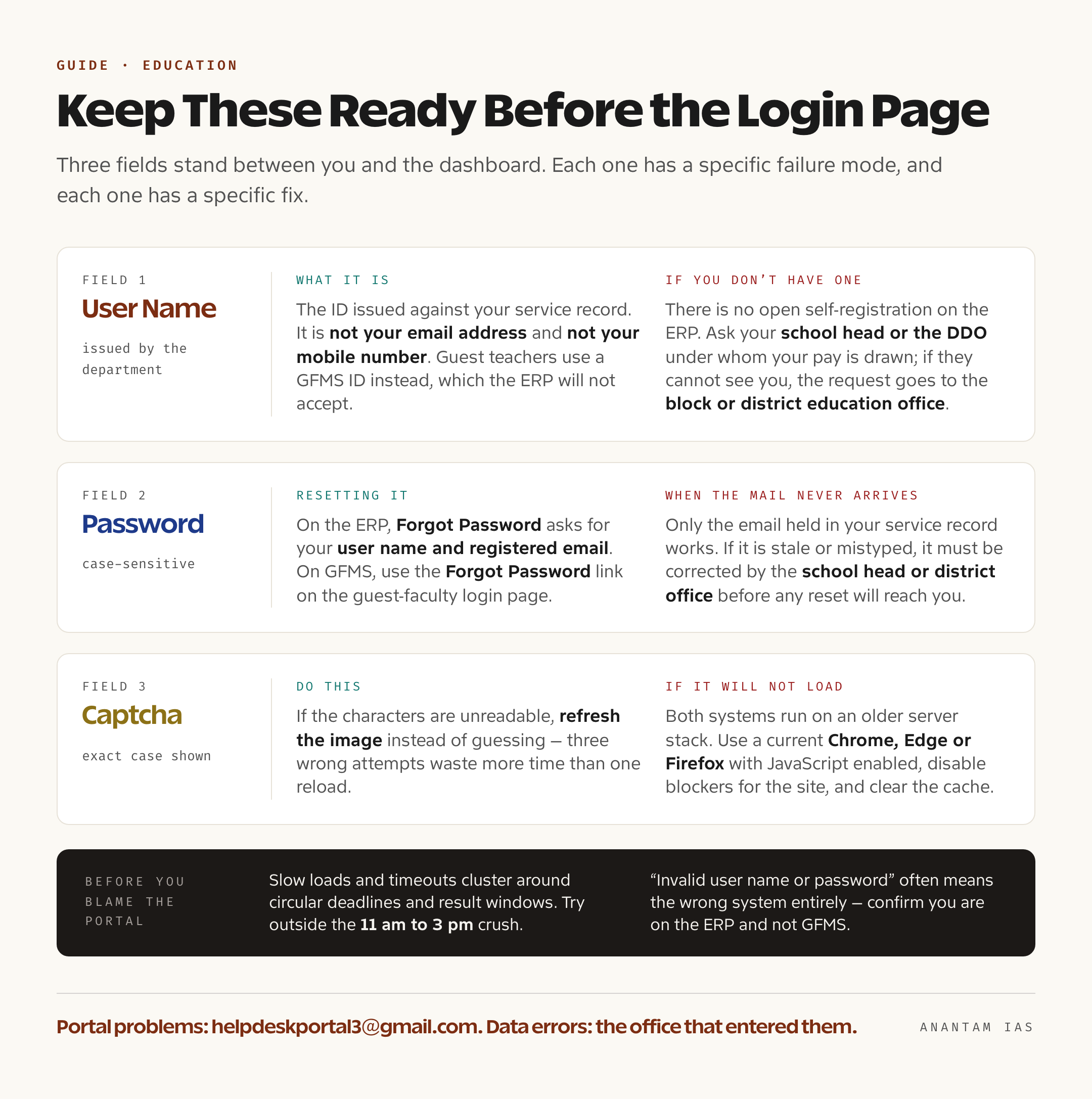
- अपना User Name डालें। यह service record के आधार पर department द्वारा दी गई ID है। यह email address या mobile number नहीं है।
- Password डालें। यह case-sensitive है।
- Captcha जैसा दिख रहा है, वैसा ही type करें। अक्षर पढ़ने में न आएँ तो अंदाज़ा लगाने के बजाय image refresh करें। तीन गलत कोशिशों से बेहतर एक reload है।
- Login पर click करें।
Guest teachers, GFMS login:
- gfms.educationportal3.in सीधे खोलें या ERP login page पर दिए अतिथि शिक्षक पोर्टल link का इस्तेमाल करें।
- अतिथि शिक्षक लॉग इन (Guest Faculty Login) पर click करें।
- अपनी GFMS user ID और password डालें, captcha पूरा करें और sign in करें।
- ID याद न हो तो कुछ reset करने से पहले GFMS home page का Know Your Id link इस्तेमाल करें। ID recover करना और password recover करना अलग flows हैं। लोग अक्सर ID चाहिए होने पर password reset करने लगते हैं।
Browser को लेकर एक व्यावहारिक बात। दोनों systems पुराने server stack पर चलते हैं और current Chrome, Edge या Firefox में बेहतर काम करते हैं। JavaScript on रखें और captcha image को रोकने वाला ad-blocker न हो। Captcha broken image दिखे तो लगभग हमेशा blocker या stale cache वजह है, portal outage नहीं।
GFMS home page पर guest-teacher circulars भी बिना login खुले रहते हैं: joining और re-joining instructions, honorarium payment orders, e-attendance requirements, vacancy lists और district-committee orders। अगर सवाल यह है कि इस महीने department ने guest teachers के बारे में क्या order निकाला है, तो login किए बिना ही जवाब मिल सकता है।
पहली बार registration और credentials लेना
ERP side पर कोई open self-registration नहीं है। यह जानबूझकर है। ERP में service records होते हैं, इसलिए identity user नहीं, department बनाता है।
अगर आप नए posted teacher या नए transferred employee हैं और आपके पास ERP credentials नहीं हैं:
- अपने school head या उस DDO से पूछें जिसके तहत आपका वेतन निकलता है। Institution-level administrator आपको system में map करके ID जारी या revive करता है।
- School head आपको system में न देख पाए तो request block या district education office को भेजी जाती है। वही अपने schools के staff mapping का काम करता है।
- Unique employee identifier और DDO code साथ रखें। Main portal पर दो open lookups हैं: अपनी विशिष्ट आईडी जानें (know your unique ID) और अपने DDO Code जानें। इनके ज़रिए दोनों details खुद देख सकते हैं।
Guest-faculty side अलग है और पहली बार registration ज़्यादातर यहीं होता है। GFMS में applicants register करते हैं, details verify कराते हैं और खाली पदों पर placement के लिए eligible बनते हैं। हर academic session से पहले department circular के ज़रिए registration और verification windows खोलता है और dates GFMS home page पर डालता है। Current session में GFMS dashboard के pool में तीन लाख से अधिक verified applicants दिखते हैं। इससे vacancy lists की competition का अंदाज़ा मिलता है।
Guest-teacher applicant का broad sequence है: GFMS पर register करें, academic और eligibility details भरें, department के current circular के अनुसार school या district level पर details verify कराएँ और फिर अपने subject तथा school की published vacancy lists, यानी अतिथि शिक्षक हेतु संभावित रिक्तियाँ, देखते रहें। Exact window, documents और verification authority session के साथ बदल सकते हैं। इसलिए पुराने blog के बजाय GFMS home page का latest circular पढ़ें। Orders date के साथ newest first लगे होते हैं और इसे देखने में करीब एक मिनट लगता है।
Dashboard पर मुख्य services
Login के बाद आपको क्या दिखेगा, यह role पर निर्भर करता है। मोटे तौर पर platform पर ये services हैं।
| क्षेत्र | क्या मिलता है | कौन इस्तेमाल करता है |
|---|---|---|
| Staff and service records | Posting orders, subject allocation, transfers, pay और DDO mapping | Regular staff, school heads, office staff |
| Guest faculty (GFMS) | Registration, verification, vacancy lists, engagement orders, honorarium और e-attendance | Guest teachers, school heads |
| Student records | Enrolment, student directory और student tracking | Schools; directories public हैं |
| Scholarships | Integrated scholarship scheme management system | Schools और sanctioning offices |
| Entitlement schemes | Free textbooks, free uniforms, free scooty scheme और high scorers के लिए laptop incentive | Schools और district offices |
| Inclusive education | Special needs वाले बच्चों की पहचान, aid और tracking | Schools, resource staff |
| Hostels | KGBV, model और excellence hostels, disabilities वाले बच्चों के hostels और hostel application form | Schools; application public है |
| Institutions | DIET और district resource centres, Sainik schools, central library scheme | Department offices |
| Teaching resources | “Hamare Shikshak” section और digital repository | Teachers, सभी के लिए खुला |
| Grievances | Public servants login के बाद grievance दर्ज कर सकते हैं | Departmental staff |
Department portal से जुड़े companion mobile apps भी चलाता है: mEducationPortal app, child-tracking app और Hamare Shikshak app। ये उसी data तक पहुँचने के सुविधाजनक रास्ते हैं, अलग accounts नहीं। Web पर चलने वाले credentials वहाँ भी काम करते हैं।
आम login problems और उनके हल
| Problem | आम तौर पर क्या हो रहा है | क्या करें |
|---|---|---|
| ERP पर “Invalid user name or password” | गलत portal या password की मियाद निकल गई | Confirm करें कि आप sederp.educationportal3.in पर हैं, GFMS पर नहीं। फिर Forgot Password इस्तेमाल करें, जिसमें user name और registered email माँगा जाता है |
| Guest teacher login नहीं कर पा रहा | ID भूल गई या registration के बाद password set नहीं हुआ | पहले GFMS home page का Know Your Id, फिर guest-faculty login page का Forgot Password link इस्तेमाल करें। Portal भी ticket उठाने के बजाय यही रास्ता बताता है |
| Captcha load नहीं होता या reject होता है | Ad-blocker, cached page या पुराना browser | Page reload करें, site के लिए blocker हटाएँ, cache साफ़ करें और captcha जैसा दिखे ठीक वैसा type करें |
| Password reset email नहीं आता | Record वाला email पुराना या गलत typed है | केवल service record में मौजूद email काम करता है। गलत हो तो school head या district office से correction कराएँ |
| Portal slow या timeout | Circular deadlines और result windows पर peak load | 11 am से 3 pm की भीड़ के बाहर कोशिश करें। Deadline वाले दिन bulk entry न करें |
| आप पूरी तरह wrong system में हैं | Guest teacher ERP में या regular teacher GFMS में जा रहा है | Role के अनुसार door चुनें: departmental staff के लिए ERP और guest faculty के लिए GFMS |
Reset flows से हल न हो तो ERP login page पर department का helpdesk email [email protected] दिया गया है। Departmental employees को login करके Education Portal 3.0 में grievance record करने को कहा गया है, ताकि वह उनके record से जुड़ी रहे। Service record में data error हो तो पहली जगह school head या DDO है, क्योंकि entry उसी office को ठीक करनी होगी जिसके पास उसका अधिकार है।
एक आदत काम आती है। जब circular से process बदले, जैसे verification dates, e-attendance rules या documents की list, तो portal की dated और numbered PDF को authority मानें। WhatsApp पर forward हुए screenshots से आधा confusion शुरू होता है।
सामान्य प्रश्न
क्या Education Portal 3.0 पर student या parent login है? नहीं। Students और parents को individual passwords नहीं मिलते। इसके बजाय school search, school और student directories, student tracking, “know your unique ID” और hostel application form बिना sign in के चलती हैं।
ERP login और GFMS login में क्या अंतर है? sederp.educationportal3.in वाला ERP regular School Education Department staff के लिए है और service-record काम संभालता है। gfms.educationportal3.in वाला GFMS Guest Faculty Management System है, जिसका इस्तेमाल guest teachers registration, verification, vacancies और engagement के लिए करते हैं। दोनों accounts अलग हैं और एक-दूसरे की जगह नहीं चलेंगे।
Education Portal 3.0 का password भूल गया हूँ। कैसे reset करूँ? ERP login page पर Forgot Password चुनें और user name तथा record में registered email दें। GFMS में guest-faculty login page का Forgot Password link इस्तेमाल करें। समस्या password नहीं, ID की हो तो पहले GFMS पर Know Your Id देखें।
क्या मैं portal पर खुद नया user register कर सकता हूँ? ERP पर नहीं। Department school head या DDO के ज़रिए identity बनाता है। Guest-teacher applicants GFMS पर खुद register कर सकते हैं, लेकिन केवल department के circular में बताई गई registration और verification window में।
Official website कौन-सी है? School Education Department का platform educationportal3.in है। ERP sederp.educationportal3.in और guest faculty GFMS gfms.educationportal3.in पर है। कई private sites मिलते-जुलते नामों से search में ऊपर आती हैं। उन पर credentials न डालें।
Portal पर कुछ गलत हो तो शिकायत कहाँ करूँ? Portal-related problems के लिए [email protected] दिया गया है। Departmental employees login करके grievance record करें, ताकि वह उनके record से जुड़ी रहे। अपने service या school data की गलती वही office ठीक करेगा जिसने उसे दर्ज किया है, आम तौर पर school head और उसके बाद block या district education office।