Government e-Marketplace पर भारत की public buying का बड़ा हिस्सा अब होता है। जिला कार्यालय laptops मँगाए, railway workshop safety gear खरीदे या ministry housekeeping service ले, transaction एक ही खुले portal से चलता है और prices दिखाई देती हैं। छोटे manufacturer या service firm के लिए GeM account सरकारी customer तक पहुँचने का सबसे सीधा कानूनी रास्ता हो सकता है।
और शुरुआत login box से होती है। यह guide portal, sign-in का दो-screen flow, sellers और buyers के registration documents, account के अंदर की services और login अटकने पर आगे बढ़ने का तरीका बताती है।
Portal क्या है और किसे इस्तेमाल करना चाहिए
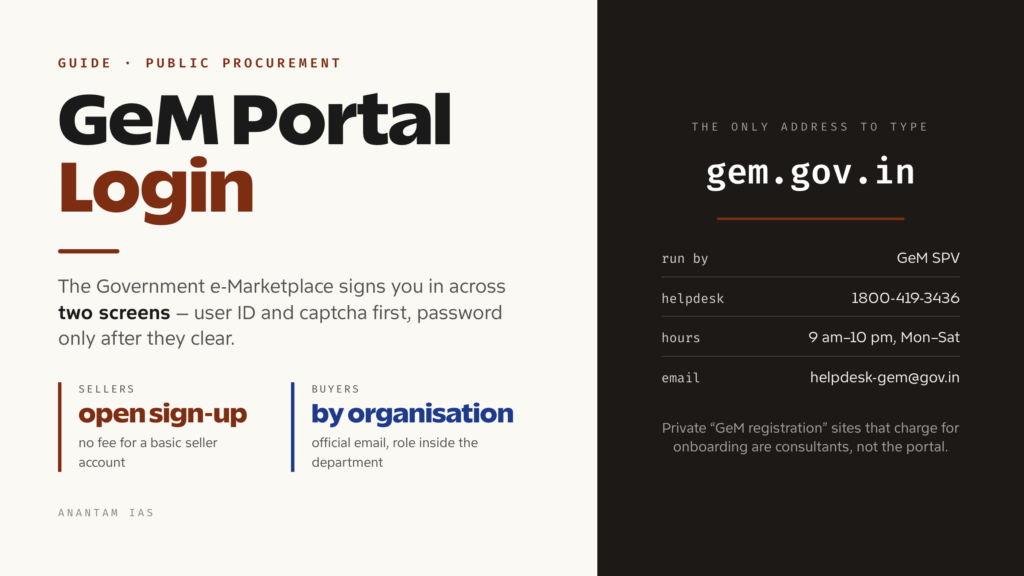
GeM national public procurement portal है, जिसे Department of Commerce के तहत पूरी तरह government-owned Section 8 company GeM SPV gem.gov.in पर चलाती है। Central और state ministries, departments, public sector undertakings, autonomous institutions और local bodies रोज़मर्रा के goods और services paper tenders तथा rate contracts के बजाय online खरीद सकें, यही इसका काम है।
यह पहले Directorate General of Supplies and Disposals के काम से विकसित हुआ और तेज़ी से बड़ा हुआ है। Portal के live counters पर 10,500 से अधिक product categories और करीब 350 service categories दिखती हैं। Cumulative order value लाखों करोड़ रुपये तक पहुँच चुकी है।
एक ही front door से दो बिल्कुल अलग तरह के users आते हैं:
Sellers और service providers. Government जो खरीदती है, उसे supply कर सकने वाला कोई भी business, जैसे manufacturer, reseller, MSE, startup या service contractor। Registration खुला है और basic seller account बनाने की कोई फीस नहीं है।
Buyer organisations. अपने department या PSU की ओर से procurement करने के लिए authorised government officers। Buyer account कोई व्यक्ति मनमाने ढंग से नहीं खोलता। यह organisation, official email domain और organisation की verification chain से जुड़ा होता है। Demand बनाने, approve करने और payment करने की भूमिकाएँ अलग लोगों के पास रहती हैं।
एक तीसरा group भी है: forward auction users। यहाँ government खरीदती नहीं, बेचती है। Portal पर इनके लिए अलग buyer registration और login links हैं।
Version को लेकर एक बात। GeM नया interface GeM New नाम से धीरे-धीरे ला रहा है। उसकी registration page कहती है कि controlled rollout में login और sign-up अभी सीमित users के लिए खुले हैं। अगर page कहे कि आपको access अभी नहीं मिला, तो वजह यही है। Existing portal चलता रहेगा।
Login कैसे करें, चरण-दर-चरण
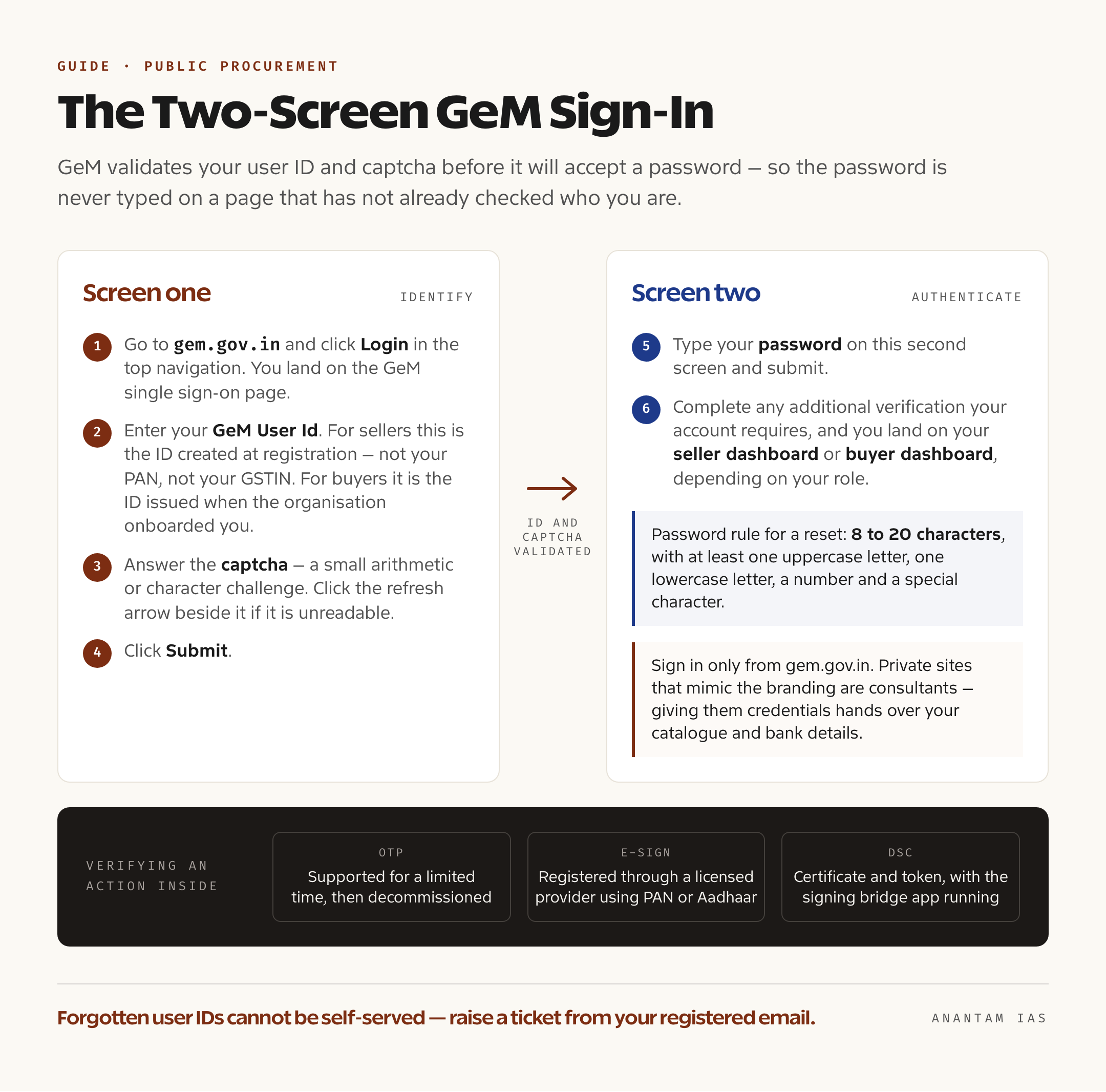
Sign-in जानबूझकर दो screens में बाँटा गया है। जब तक ID validate न हो जाए, password ऐसे page पर type नहीं करना पड़ता जो आपकी पहचान पहले से नहीं जानता।
- gem.gov.in पर जाएँ और top navigation में Login click करें। आप GeM single sign-on page पर पहुँचेंगे।
- अपना GeM User Id डालें। Seller के लिए यह registration के समय बनी ID है, PAN या GSTIN नहीं। Buyer के लिए organisation onboarding के समय दी गई ID है।
- Captcha भरें। GeM छोटा arithmetic या character challenge और उसके पास refresh icon देता है। पढ़ा न जाए तो refresh arrow दबाएँ।
- Submit click करें। Page खुद बताता है कि user ID और captcha validate होने के बाद अगली screen पर password डालना है।
- दूसरी screen पर password डालकर submit करें।
- Account की ज़रूरत के अनुसार extra verification पूरी करें। फिर role के हिसाब से seller या buyer dashboard खुलेगा।
इस flow को लेकर कुछ व्यावहारिक बातें याद रखें। Portal में sensitive actions की अलग verification होती है। GeM seller FAQ के अनुसार document या transaction OTP, e-Sign या Digital Signature Certificate से verify हो सकता है। OTP अभी चलता है, लेकिन सीमित समय के लिए और बाद में decommission किया जाना है। GeM पर गंभीरता से काम करते हैं तो e-Sign या DSC पहले से तैयार रखें।
Sign in केवल gem.gov.in से करें। Search में private “GeM registration” sites बहुत आती हैं, जो government branding की नकल करके onboarding फीस लेती हैं। वे consultants हैं, portal नहीं। उन्हें credentials देने का मतलब अपना catalogue और bank details सौंपना है।
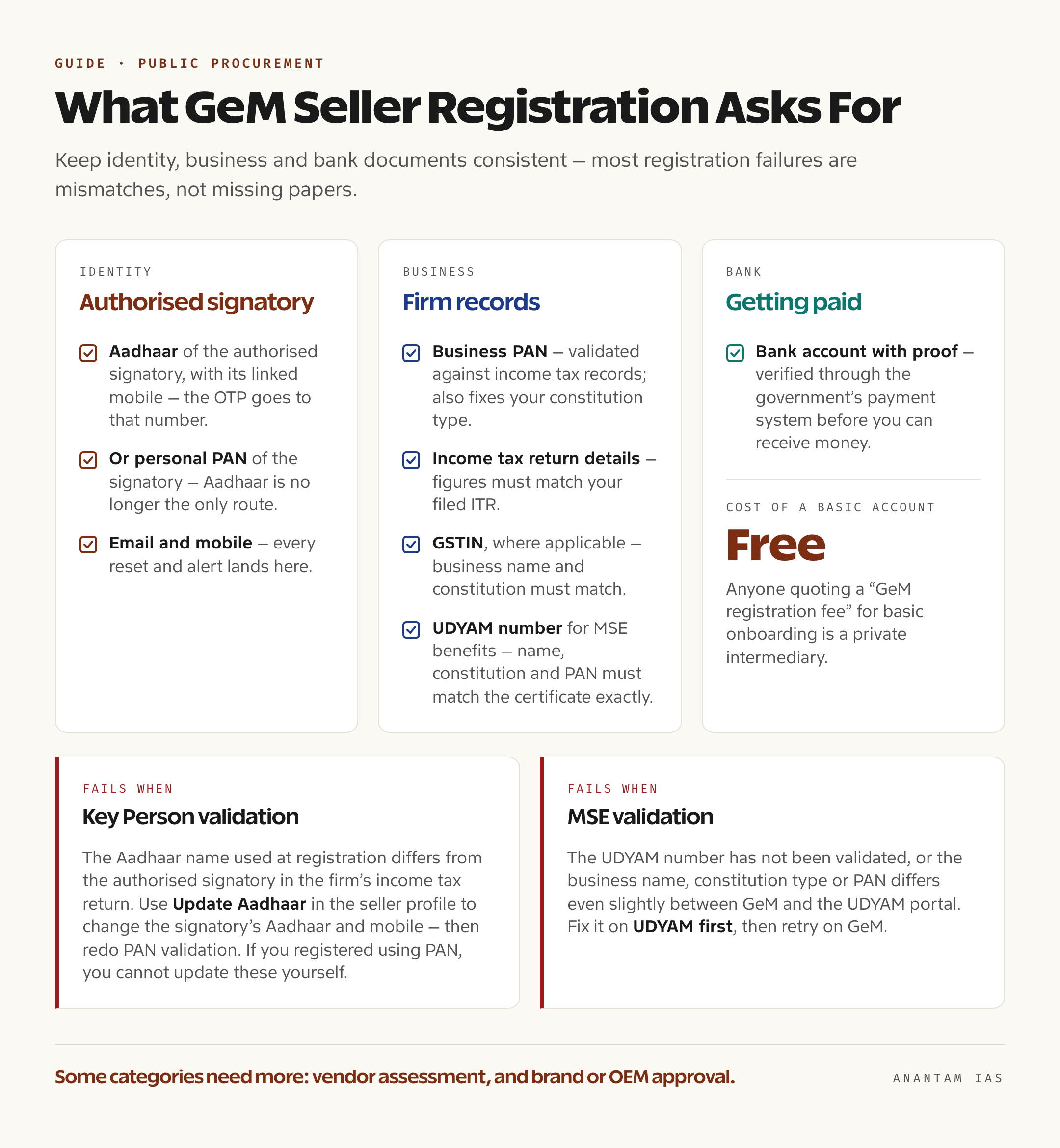
GeM password स्वीकार करने से पहले user ID और captcha validate करता है। Identity, business और bank documents में जानकारी एक जैसी रखें। ज़्यादातर registration failures missing papers से नहीं, mismatches से होते हैं।
पहली बार registration
Registration पहले ही click पर दो रास्तों में बँटता है। Portal पर Sign Up में Buyer Organisation और Seller / Service Provider के options हैं।
Seller और service provider registration
शुरू करने से पहले ये चीज़ें तैयार रखें और सभी में details एक जैसी हों:
| क्या चाहिए | क्यों ज़रूरी है |
|---|---|
| Authorised signatory का Aadhaar और उससे linked mobile | Identity verification; OTP Aadhaar-linked number पर आएगा |
| या authorised signatory का personal PAN | Aadhaar अकेला रास्ता नहीं है; identity verification के लिए personal PAN भी चलता है |
| Business PAN | Income-tax records से validate होता है और constitution type भी तय करता है |
| Income-tax return details | Tax validation के लिए; figures filed ITR से मिलनी चाहिए |
| जहाँ लागू हो GSTIN | Business name और constitution match होने चाहिए |
| MSE benefits के लिए UDYAM registration number | Business name, constitution और PAN UDYAM certificate से बिल्कुल match होने चाहिए |
| Proof के साथ bank account | पैसा मिलने से पहले government payment system से verify होता है |
| Email और mobile | हर reset और alert यहाँ आता है |
Broad sequence है: seller registration चुनें, Aadhaar OTP या personal PAN से identity verify करें, terms and conditions accept करें, GeM user ID और password बनायें और फिर seller profile पूरा करें। इसमें organisation details, tax validation, bank account और जिन categories में बेचेंगे, वे शामिल हैं।
दो validation steps सबसे ज़्यादा रोकते हैं और GeM का FAQ दोनों पर साफ़ है।
Key Person validation तब fail होती है जब registration में इस्तेमाल Aadhaar का नाम company या firm के income-tax return पर मौजूद authorised signatory के नाम से अलग हो। दोनों एक ही व्यक्ति होने चाहिए। कोई दूसरा व्यक्ति ITR sign करता है तो seller profile में Update Aadhaar option से signatory का Aadhaar और mobile बदला जा सकता है। Aadhaar बदलने के बाद PAN validation फिर करनी होगी। PAN से register किया है, तो ये details खुद update नहीं कर सकते।
MSE validation UDYAM number validate न होने पर या GeM और UDYAM portal में business name, constitution type या PAN में थोड़ा भी अंतर होने पर fail होती है। पहले UDYAM पर ठीक करें, फिर GeM पर दोबारा कोशिश करें।
Basic registration के बाद कुछ categories में Vendor Assessment या documented exemption और OEM dashboard के ज़रिए brand या OEM approval चाहिए। Registered brand हो तो registered trademark certificate भी लग सकता है। एक बदलाव याद रखें: 2020 से sellers पर लागू refundable caution money deposit 2025 में बंद कर दिया गया। Verified bank account होने पर dashboard से बची रकम निकाली जा सकती है।
Buyer organisation registration
Buyer onboarding व्यक्ति के बजाय organisation के ज़रिए होता है। Recognised government या PSU entity के नाम पर official email से registration होता है और account organisation की hierarchy में तय role के साथ activate होता है। GeM procurement में duties अलग हैं: demand उठाने, approve करने और payment release करने वाला एक ही login नहीं होना चाहिए। Government officer को access चाहिए तो department के existing primary user या nodal officer से बात करना सही पहला कदम है, public sign-up नहीं।
Dashboard पर मुख्य services
Login के बाद आपको क्या दिखेगा, यह इस बात पर निर्भर है कि आप market के किस side पर हैं।
| क्षेत्र | Sellers और service providers | Buyer organisations |
|---|---|---|
| Catalogue | Product या service listings बनाना और edit करना, categories से map करना, prices manage करना | Catalogue search करना, offers compare करना, cart बनाना |
| Bids और auctions | Live bids और reverse auctions देखना, offers submit करना, results track करना | Bids और reverse auctions publish करना, offers evaluate करना |
| Orders | Orders accept करना, invoices बनाना, delivery obligations track करना | Direct purchase orders देना, contracts जारी करना |
| Fulfilment | Dispatch update करना, consignee receipt issues का जवाब देना | Consignee receipt certificate के ज़रिए receipt और acceptance दर्ज करना |
| Payments | Verified bank account के against invoice और payment status track करना | Payment process करना, payment timelines देखना |
| Profile | Tax और MSE validation, brand और OEM approvals, vendor assessment status, bank accounts | Organisation details, user roles और approvals |
| Support | Tickets raise और track करना | Tickets raise और track करना |
नए seller के लिए revenue तक पहुँचने वाला क्रम glamorous नहीं है: profile validation पूरा करें, सही categories में listing लें और फिर रोज़ उन categories की bids देखें। Invalidated catalogue या गलत category में रखा product उन buyers को दिखता ही नहीं जो उसे खरीद सकते थे।
आम login problems और उनके हल
Password भूल गए। GeM seller FAQ में दो रास्ते हैं। पहला, login page पर “Forgot your GeM password?” click करें, user ID डालें और registered email पर आए reset link से नया password set करें। दूसरा, “Reset GeM Password” link लें, user ID डालें और registered mobile तथा email दोनों पर आए OTP से reset करें। दोनों तरीकों में password 8 से 20 characters का होना चाहिए और उसमें uppercase, lowercase, number तथा special character हो।
User ID भूल गए। Password की तरह इसे self-service से recover नहीं किया जा सकता। पहले GeM का registration confirmation email देखें। वह न मिले तो registered email से helpdesk ticket उठाएँ। इसी से वे request को account से जोड़ पाएँगे।
OTP नहीं आया। Aadhaar वाले steps में OTP UIDAI के साथ linked Aadhaar mobile number पर जाता है, रोज़ इस्तेमाल होने वाले किसी दूसरे number पर नहीं। Email copy के लिए spam folder देखें और handset पर transactional SMS block तो नहीं है, यह जाँचें।
Registration validation बार-बार fail हो रही है। Error text को उसी अर्थ में पढ़ें। “Key Person” Aadhaar और ITR में नाम के mismatch की ओर इशारा करता है। “MSE Verification” UDYAM की ओर। Tax validation में filed return से न मिलने वाली figures वजह हैं। Source record, यानी ITR या UDYAM certificate, ठीक करना GeM पर बार-बार submit करने से तेज़ होता है।
Password expired या account खुल ही नहीं रहा। पहले reset flow आज़माएँ। Reset भी fail हो तो account ऐसे email या mobile से जुड़ा हो सकता है जिस पर आपका control नहीं रहा। यह helpdesk ticket का मामला है, retry का नहीं।
Browser problem. Current mainstream browser लें, site का cache और cookies साफ़ करें और autofill या scripts block करने वाली extensions बंद करें। DSC signing के लिए bridge application उसी machine पर चल रही होनी चाहिए और firewall से allowed हो।
Official help. GeM contact page पर 1800-419-3436 और 1800-102-3436 toll-free helpdesk numbers हैं। ये Monday से Saturday, 9:00 am से 10:00 pm तक खुले हैं। Email [email protected] है। Railways के लिए 0120-6438300 और Defence तथा Ministry of Home Affairs के लिए 0120-6438200 पर संपर्क किया जा सकता है। लिखित trail के लिए gem.gov.in/gemtickets/create पर ticket raise करें और gem.gov.in/gemtickets/search पर track करें। Error का screenshot लगाएँ। Walk-in support 2nd Floor, Jeevan Tara Building, 5-Sansad Marg, Patel Chowk के पास, New Delhi 110001 में weekdays पर 9:00 am से 6:00 pm तक है।
सामान्य प्रश्न
क्या GeM पर seller registration की कोई फीस है? Basic seller account बनाना मुफ़्त है। Vendor assessment जैसी category-specific requirements में assessing agency की फीस हो सकती है। Caution money deposit 2025 में बंद हो चुका है। Basic onboarding के लिए “GeM registration fee” माँगने वाला private intermediary है।
क्या GeM पर बेचने के लिए GST registration ज़रूरी है? हर बार नहीं। यह इस बात पर निर्भर है कि आप क्या supply करते हैं और GST law के तहत registration के लिए liable हैं या नहीं। अगर GSTIN है, तो business name, PAN और constitution type GeM में भरी जानकारी से match होना चाहिए, वरना profile validation fail होगी।
क्या Aadhaar के बजाय PAN से register कर सकता हूँ? हाँ। Seller registration में Aadhaar अब mandatory नहीं है। Authorised signatory का personal PAN identity verification के लिए accepted है। लेकिन PAN से register करने पर बाद में profile में signatory details खुद update नहीं कर पाएँगे।
GeM पर “Key Person” validation fail क्यों दिखती है? Registration में इस्तेमाल Aadhaar का नाम business के income-tax return पर sign करने वाले व्यक्ति के नाम से match नहीं करता। GeM दोनों को एक ही व्यक्ति चाहता है। Seller profile में ITR-authorised signatory का Aadhaar update करें, validation फिर चलाएँ और PAN validation भी दोबारा करें।
क्या ordinary citizen या private company buyer account खोल सकती है? नहीं। Buyer accounts government departments, PSUs, autonomous bodies और local bodies की ओर से official procurement करने वाले authorised officers के लिए हैं। Government surplus assets बेचने वाली GeM forward auctions का buyer registration अलग है।
क्या दो लोग एक GeM login share कर सकते हैं? नहीं करना चाहिए। GeM पर roles जानबूझकर अलग हैं, ताकि purchase उठाने, approve करने और payment करने का काम एक ही हाथ में न हो। Sellers भी अपने account की activity के लिए जिम्मेदार हैं। Password बाँटने के बजाय organisation में हर व्यक्ति का अपना user बनायें।