

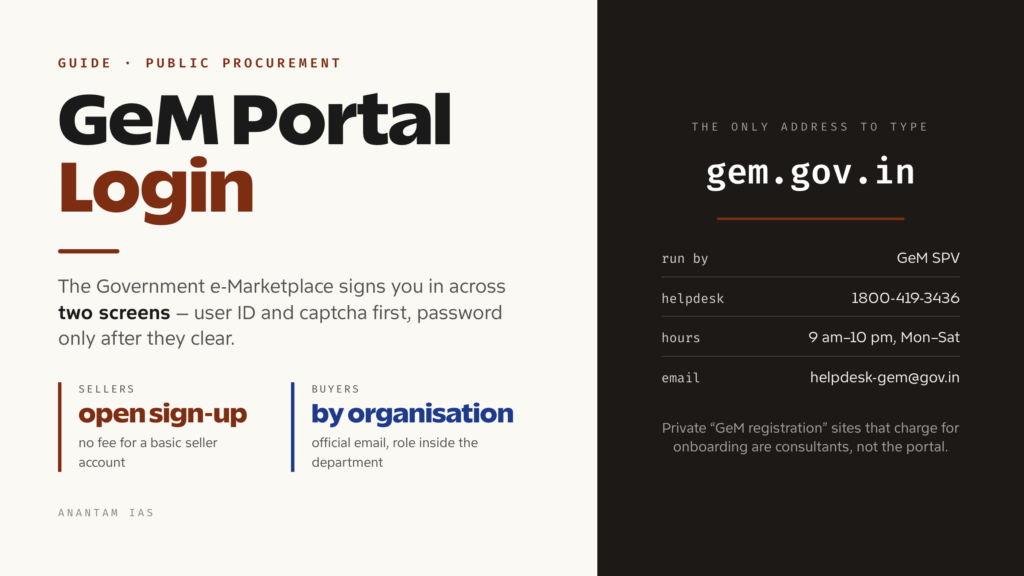
The Government e-Marketplace is where a very large share of India’s public buying now happens. A district office ordering laptops, a railway workshop buying safety gear, a ministry hiring housekeeping services — the transaction runs through one portal, in the open, with prices visible. For a small manufacturer or a service firm, a GeM account is often the shortest legal route to a government customer.
And the whole thing starts at a login box. This guide covers what the portal is, how the sign-in actually works (it is a two-screen flow, which surprises first-timers), what sellers and buyers need to register, what you can do once you’re inside, and how to get unstuck when the login refuses you.
What the Portal Is and Who Should Use It
GeM is the national public procurement portal, operated at gem.gov.in by GeM SPV — a fully government-owned Section 8 company under the Department of Commerce. It exists so that central and state ministries, departments, public sector undertakings, autonomous institutions and local bodies can buy commonly used goods and services online rather than through paper tenders and rate contracts.
It grew out of the work once done by the Directorate General of Supplies and Disposals, and it has scaled hard. The portal’s own live counters put the catalogue at more than 10,500 product categories and around 350 service categories, with cumulative order value running into lakhs of crores of rupees.
Two very different kinds of users share the same front door:
Sellers and service providers. Any business that can supply what government buys — manufacturers, resellers, MSEs, startups, service contractors. Registration is open and there is no fee to create a basic seller account.
Buyer organisations. Government officers authorised to procure on behalf of their department or PSU. A buyer account is not something an individual opens casually; it is tied to an organisation, an official email domain and a verification chain inside that organisation, with roles split between the person who creates a demand, the one who approves it, and the one who pays.
There’s a third group worth naming: forward auction users, where government sells rather than buys, with its own separate buyer registration and login links on the portal.
A note on versions. GeM has been rolling out a rebuilt interface, referred to on the site as GeM New, and its own registration page says login and sign-up there are open to a limited set of users during a controlled rollout. If a page tells you access hasn’t been expanded to you yet, that’s the reason, and the existing portal continues to work.
How to Log In, Step by Step
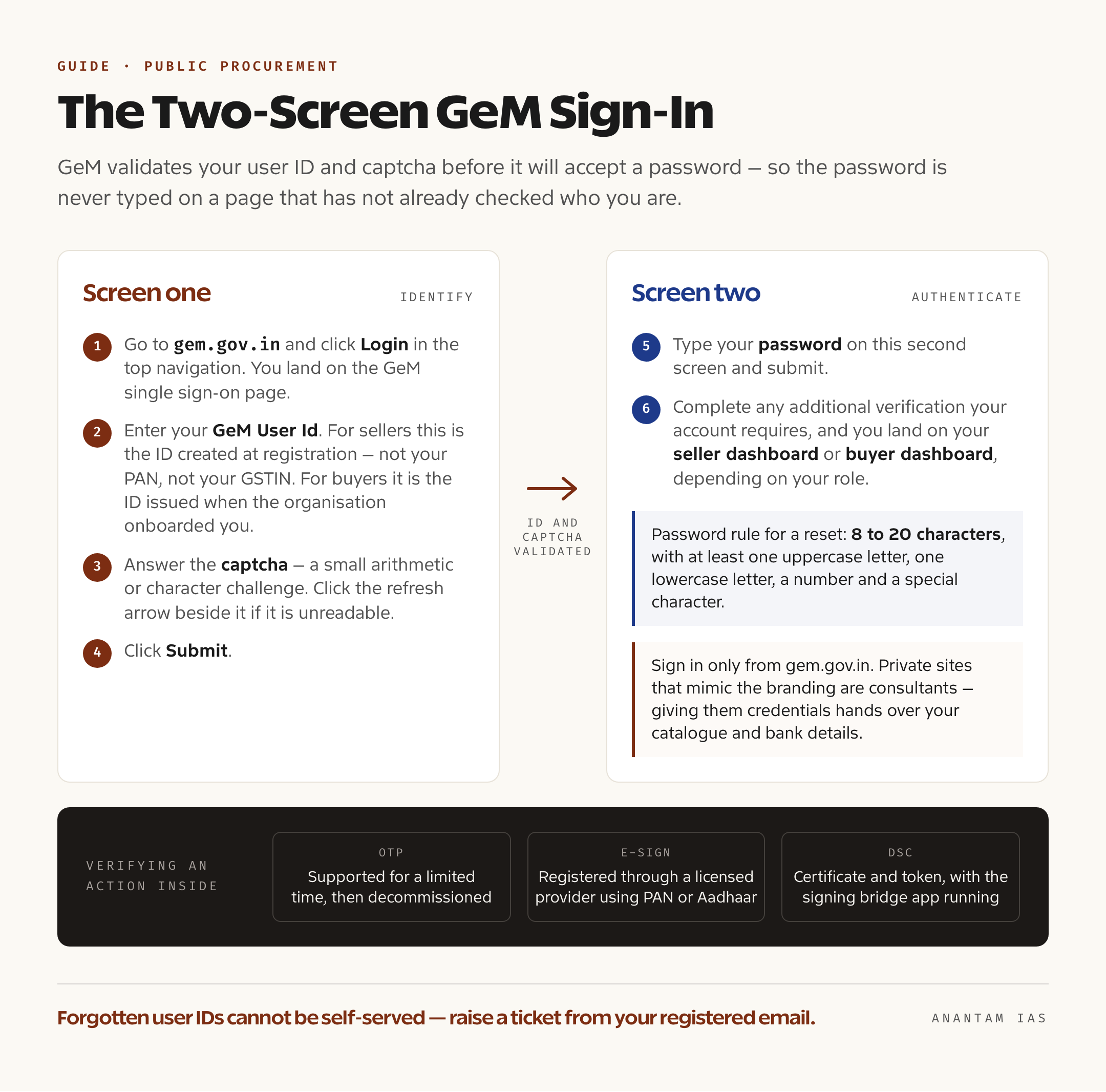
The sign-in is deliberately split across two screens, so the password is never typed on a page that hasn’t already validated your ID.
- Go to gem.gov.in and click Login in the top navigation. You’ll be taken to the GeM single sign-on page.
- Enter your GeM User Id. For sellers this is the ID created at registration — not your PAN, not your GSTIN. For buyers it is the ID issued when the organisation onboarded you.
- Answer the captcha. GeM uses a small arithmetic or character challenge with a refresh icon beside it; click the refresh arrow if it’s unreadable.
- Click Submit. The page itself tells you what happens next: the password is entered on the following screen, once the user ID and captcha have been validated.
- On the second screen, type your password and submit.
- Complete any additional verification your account requires and you land on your dashboard — the seller dashboard or the buyer dashboard, depending on your role.
A few practical things about this flow.
Sensitive actions inside the portal are separately verified. GeM’s own seller FAQ says a document or transaction can be verified using OTP, e-Sign, or a Digital Signature Certificate — and that while OTP is still supported, it is supported for a limited time and will be decommissioned later. If you trade on GeM seriously, get e-Sign or a DSC organised before it becomes urgent.
Sign in only from gem.gov.in. Search results throw up a lot of private “GeM registration” sites that mimic the government’s branding and charge for onboarding. They are consultants, not the portal, and handing them your credentials hands over your catalogue and your bank details.
Registering for the First Time
Registration branches at the very first click. On the portal, Sign Up offers two options: Buyer Organisation and Seller / Service Provider.
Seller and service provider registration
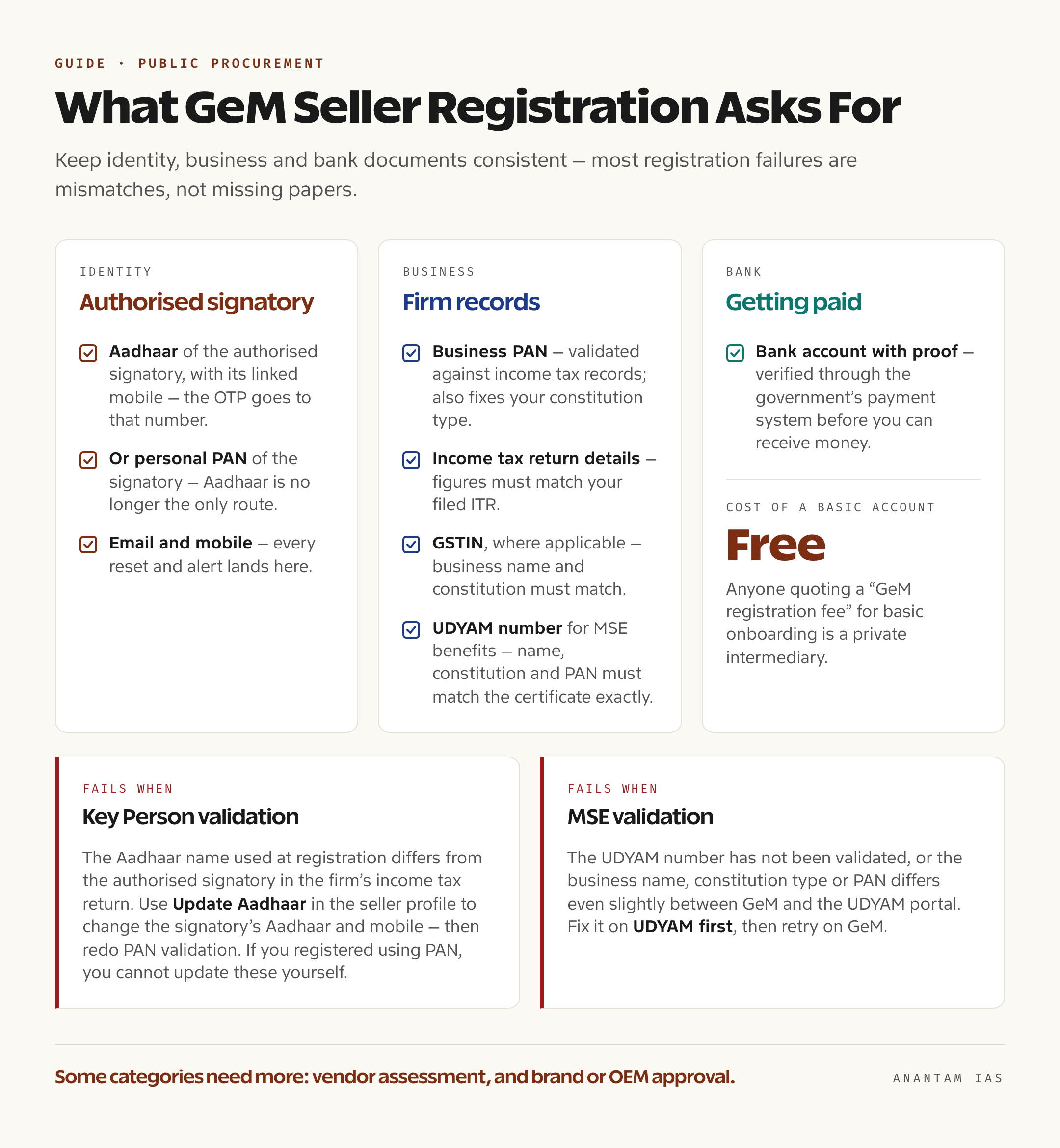
You’ll need these before you start, and they need to agree with one another:
| What | Why it matters |
|---|---|
| Aadhaar of the authorised signatory, with its linked mobile | Identity verification; the OTP goes to the Aadhaar-linked number |
| Or personal PAN of the authorised signatory | Aadhaar is no longer the only route — personal PAN is accepted for identity verification |
| Business PAN | Validated against income tax records; also fixes your constitution type |
| Income tax return details | Used for tax validation; figures must match your filed ITR |
| GSTIN, where applicable | Business name and constitution must match |
| UDYAM registration number, for MSE benefits | Business name, constitution and PAN must match the UDYAM certificate exactly |
| Bank account with proof | Verified through the government’s payment system before you can receive money |
| Email and mobile | Every reset and alert lands here |
The broad sequence is: choose seller registration, verify your identity by Aadhaar OTP or personal PAN, accept the terms and conditions, create your GeM user ID and password, then complete the seller profile — organisation details, tax validation, bank account, and the categories you want to sell in.
Two validation steps trip people up more than any others, and GeM’s own FAQ is blunt about both.
Key Person validation fails when the Aadhaar name used at registration is different from the name of the authorised signatory in the company or firm’s income tax return. The two must be the same person. If someone else signs the ITR, there is an “Update Aadhaar” option in the seller profile to change the signatory’s Aadhaar and mobile — and once Aadhaar is updated, PAN validation has to be done again. If you registered using PAN instead of Aadhaar, you cannot update those details yourself.
MSE validation fails when the UDYAM number hasn’t been validated, or when your business name, constitution type or PAN differs even slightly between GeM and the UDYAM portal. Fix it on UDYAM first, then retry on GeM.
Beyond basic registration, selling in some categories needs more: Vendor Assessment or a documented exemption, and brand or OEM approval through the OEM dashboard, with a registered trademark certificate where the brand is a registered one. One change worth knowing — the refundable caution money deposit sellers had to maintain from 2020 was discontinued in 2025, and money still lying in that account can be withdrawn from the dashboard once a verified bank account is in place.
Buyer organisation registration
Buyer onboarding runs through the organisation, not the individual. You register against a recognised government or PSU entity, using an official email address, and your account is activated within your organisation’s hierarchy with a defined role. Procurement on GeM separates duties — the person who raises the demand, the one who approves it, and the one who releases payment are not meant to be the same login. If you’re a government officer trying to get access, the right first step is your department’s existing primary user or nodal officer, not a fresh public sign-up.
Key Services on the Dashboard
What you see after login depends entirely on which side of the market you’re on.
| Area | Sellers and service providers | Buyer organisations |
|---|---|---|
| Catalogue | Create and edit product or service listings, map them to categories, manage prices | Search the catalogue, compare offers, build a cart |
| Bids and auctions | View live bids and reverse auctions, submit offers, track results | Publish bids and reverse auctions, evaluate offers |
| Orders | Accept orders, generate invoices, track delivery obligations | Place direct purchase orders, issue contracts |
| Fulfilment | Update dispatch, respond to consignee receipt issues | Record receipt and acceptance through the consignee receipt certificate |
| Payments | Track invoice and payment status against a verified bank account | Process payment, view payment timelines |
| Profile | Tax and MSE validation, brand and OEM approvals, vendor assessment status, bank accounts | Organisation details, user roles and approvals |
| Support | Raise and track tickets | Raise and track tickets |
For a new seller, the sequence that converts into revenue is unglamorous: finish profile validation, get listed in the right categories, then watch bids in those categories daily. A catalogue that isn’t validated, or is filed under the wrong category, is invisible to the buyers who would have bought from it.
Common Login Problems and How to Fix Them
Forgot your password. GeM’s seller FAQ describes two routes. The first: on the login page click “Forgot your GeM password?”, enter your user ID, and an email with a reset link goes to your registered email address — click it, set a new password, submit. The second: use the “Reset GeM Password” link, enter your user ID, and an OTP is sent to both your registered mobile number and email; enter the OTP, then set the new password. Either way the password must be 8 to 20 characters with at least one uppercase letter, one lowercase letter, a number and a special character.
Forgot your user ID. This one can’t be self-served the way a password can. Look first in the registration confirmation email you received from GeM. If it’s gone, raise a ticket with the helpdesk from your registered email address, which is what lets them tie the request back to your account.
OTP doesn’t arrive. For Aadhaar-based steps, the OTP goes to the mobile number linked to that Aadhaar with UIDAI — not to whatever number you use daily. If they’re different, that’s the whole problem. Check spam for the email copy, and confirm that transactional SMS isn’t blocked on the handset.
Registration validation keeps failing. Read the error text literally. “Key Person” points at an Aadhaar-versus-ITR name mismatch. “MSE Verification” points at UDYAM. Tax validation failures point at figures that don’t match your filed return, and GeM specifies which ITR fields it compares depending on your return type. Correcting the source record — the ITR, the UDYAM certificate — is usually faster than re-submitting on GeM and hoping.
Password expired or account not letting you in at all. Use the reset flow first. If reset itself fails, the account may be tied to an email or mobile you no longer control — that’s a helpdesk ticket, not a retry.
Browser trouble. Use a current mainstream browser, clear the site’s cache and cookies, and disable extensions that autofill or block scripts. For DSC signing, the bridge application has to be running locally and allowed through the firewall.
Official help routes. GeM’s contact page lists the toll-free helpdesk numbers 1800-419-3436 and 1800-102-3436, open 9:00 am to 10:00 pm, Monday to Saturday, and the email address [email protected]. There are dedicated lines for Railways (0120-6438300) and for Defence and the Ministry of Home Affairs (0120-6438200), on the same timings. For anything with a paper trail, raise a ticket at gem.gov.in/gemtickets/create and track it at gem.gov.in/gemtickets/search — attach a screenshot of the error, because it usually removes a full round of questions. Walk-in support is at the 2nd Floor, Jeevan Tara Building, 5-Sansad Marg, near Patel Chowk, New Delhi 110001, from 9:00 am to 6:00 pm on weekdays.
FAQ
Is there a fee to register as a seller on GeM? Creating a basic seller account on the portal is free. Category-specific requirements such as vendor assessment can carry charges through the assessing agency, and the caution money deposit that used to apply was discontinued in 2025. Anyone quoting a “GeM registration fee” for basic onboarding is a private intermediary.
Do I need GST registration to sell on GeM? Not universally — it depends on what you supply and whether you’re liable to register under GST law. What matters is consistency: if you do have a GSTIN, the business name, PAN and constitution type on it must match what you enter on GeM, or profile validation will fail.
Can I register with PAN instead of Aadhaar? Yes. Aadhaar is no longer mandatory for seller registration, and personal PAN of the authorised signatory is accepted for identity verification. One trade-off: if you register through PAN rather than Aadhaar, you won’t be able to self-update those signatory details later in the profile.
Why does GeM say my “Key Person” validation failed? Because the Aadhaar name used during registration doesn’t match the name of the person who signs the business’s income tax return. GeM requires them to be the same. Update the Aadhaar of the ITR-authorised signatory in the seller profile, then re-run the validation — and redo PAN validation after the change.
Can an ordinary citizen or private company open a buyer account? No. Buyer accounts on the marketplace are for authorised officers of government departments, PSUs, autonomous bodies and local bodies procuring officially. GeM’s forward auctions, where government sells surplus assets, have their own separate buyer registration.
Can two people share one GeM login? Don’t. Roles on GeM are deliberately separated so that raising, approving and paying for a purchase aren’t the same hands, and sellers are accountable for what their account does. Get each person their own user under the organisation rather than passing a password around.
Tell Google you want more of this.
Add Anantam IAS as a preferred sourceOne tap, and this site shows up more often in your own Top Stories, AI Overviews and AI Mode. Remove it any time.






