GST-registered business का tax department के साथ लगभग हर काम अब एक login box के पीछे होता है। Return file करना, challan भरना, registration certificate download करना, notice का reply देना या यह देखना कि supplier सचमुच मौजूद है या नहीं, सब कुछ आपके gst.gov.in account में है। इसलिए login fail हो तो काम रुक जाता है।
यह guide उसी क्रम में चलती है जिसमें आपको इसकी ज़रूरत पड़ेगी: portal क्या है, sign in कैसे करें, first-time login बाकी सभी logins से अलग क्यों है, credentials न हों तो registration कैसे करें, dashboard क्या देता है और password, username या OTP साथ न दे तो क्या करें।
GST Portal क्या है और किसे login चाहिए
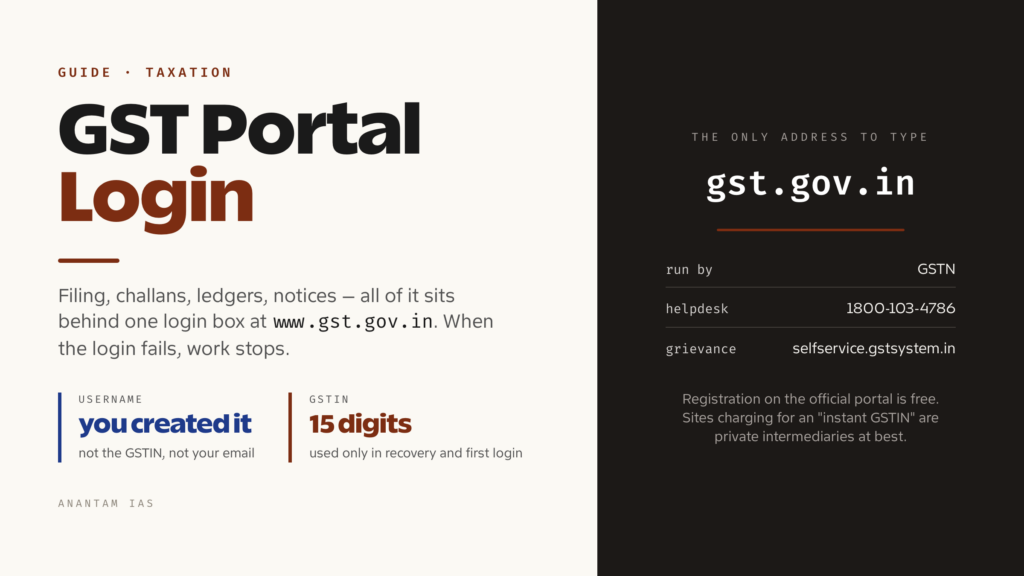
GST portal भारत के Goods and Services Tax system का common front end है। इसे Goods and Services Tax Network यानी GSTN चलाता है। GSTN केंद्र, हर राज्य और आपका assessment करने वाले tax officers के लिए साझा IT backbone बनाता और चलाता है। Official address gst.gov.in है और आपको हमेशा यही address type करना चाहिए। मिलते-जुलते कई sites “GST registration” बेचती हैं, लेकिन उनमें से कोई government portal नहीं है।
इस portal ने अलग-अलग state VAT sites, central excise और service tax systems की पुरानी patchwork व्यवस्था को बदला। July 2017 से एक 15-digit GSTIN इन सभी कामों के लिए चलता है।
इनमें से कोई हों तो login चाहिए:
- Goods या services का supplier जिसका turnover registration threshold पार करता हो, या जिसे turnover से अलग registration कराना ज़रूरी हो, जैसे inter-state supplier, e-commerce operator या agent।
- Input tax credit लेने के लिए voluntarily registered business।
- Flat rate पर tax देने वाला composition taxpayer।
- Source पर tax deduct या collect करने वाला व्यक्ति, जिसमें ज़्यादातर government departments और marketplaces आते हैं।
- नए registration के लिए apply करने वाला व्यक्ति, जो GSTIN के बजाय Temporary Reference Number से login करता है।
Read-only services के लिए login नहीं चाहिए। Homepage से GSTIN verify करना, PAN से taxpayer खोजना और HSN codes देखना public के लिए खुला है। Supplier genuine है या नहीं पूछे जाने पर login किए बिना काम हो जाता है।
Login कैसे करें, चरण-दर-चरण
Routine login छोटा है। Username और password पास रखें। GSTIN यहाँ सामान्यतः काम नहीं आता, वह कुछ recovery flows में इस्तेमाल होता है।
- Official GST portal browser में खोलें। Search result पर click करने के बजाय address type करें।
- Homepage के top right पर Login click करें।
- अपना Username डालें। यह आपने खुद बनाया था। यह GSTIN या email नहीं है।
- Password डालें। यह case-sensitive है।
- Image में दिख रहे characters, यानी captcha, type करें। साफ़ न दिखे तो अंदाज़ा लगाने के बजाय refresh करें।
- LOGIN click करें।
आप Dashboard पर पहुँचेंगे। Portal password पुराना हो जाने पर बदलने को कहे तो वहीं बदलें। इसके बिना session आगे नहीं चलेगा।
सामान्य username, password और captcha के बाद GSTN दूसरा OTP भी माँग सकता है। यह first login, नए या untrusted device, बहुत तेज़ी से की गई कई कोशिशों या दूर की location पर दिख सकता है। जिस browser को आप पहले authenticate कर चुके हैं, उसमें बाद के login पर यह न आए। Portal भारत के बाहर या untrusted IP से sign-in रोक सकता है, इसलिए हर access failure password reset से ठीक नहीं होगा। मौजूदा checks के लिए official GST login guide देखें।
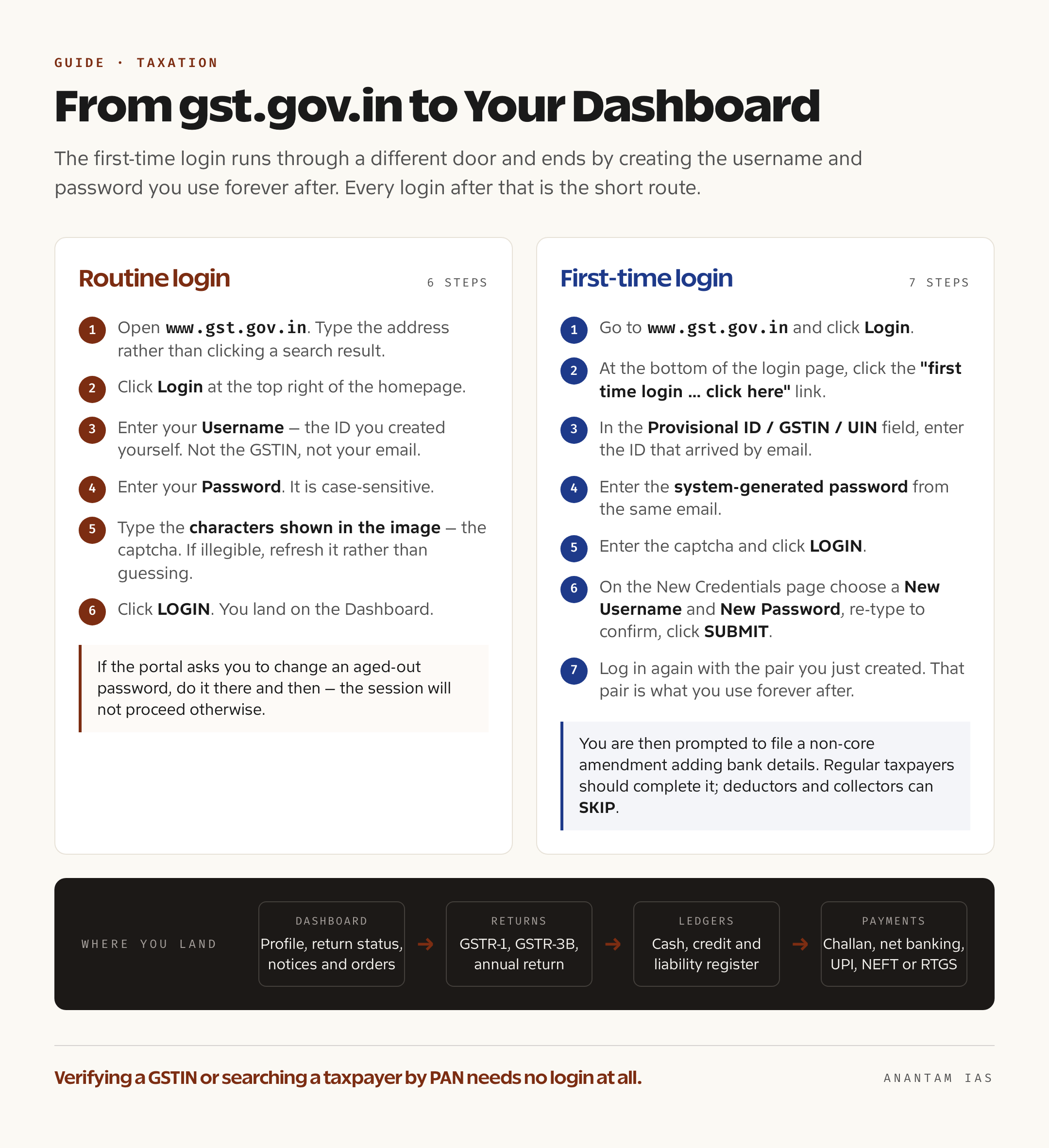
First-time login अलग है। अगर अभी credentials मिले हैं, यानी registered email पर Provisional ID या GSTIN और system-generated password आया है, तो normal login box न इस्तेमाल करें। GSTN user guide का क्रम यह है:
- www.gst.gov.in पर जाएँ और Login click करें।
- Login page के नीचे यह line मिलेगी: “First time login: If you are logging in for the first time, click here to login.” here click करें।
- Provisional ID / GSTIN / UIN field में email से आया ID डालें।
- Password field में उसी email का system-generated password डालें।
- Captcha भरें और LOGIN click करें।
- New Credentials page पर New Username और New Password चुनें, password फिर लिखकर confirm करें और SUBMIT click करें।
- Confirmation message आएगा। फिर से login करें, इस बार अपने बनाए username और password से। आगे हर बार यही pair इस्तेमाल होगा।
नए taxpayers को इस समय bank account details जोड़ने वाला non-core amendment file करने को कहा जा सकता है। Regular taxpayers इसे पूरा करें। Deductors और collectors SKIP करके बाद में details जोड़ सकते हैं।
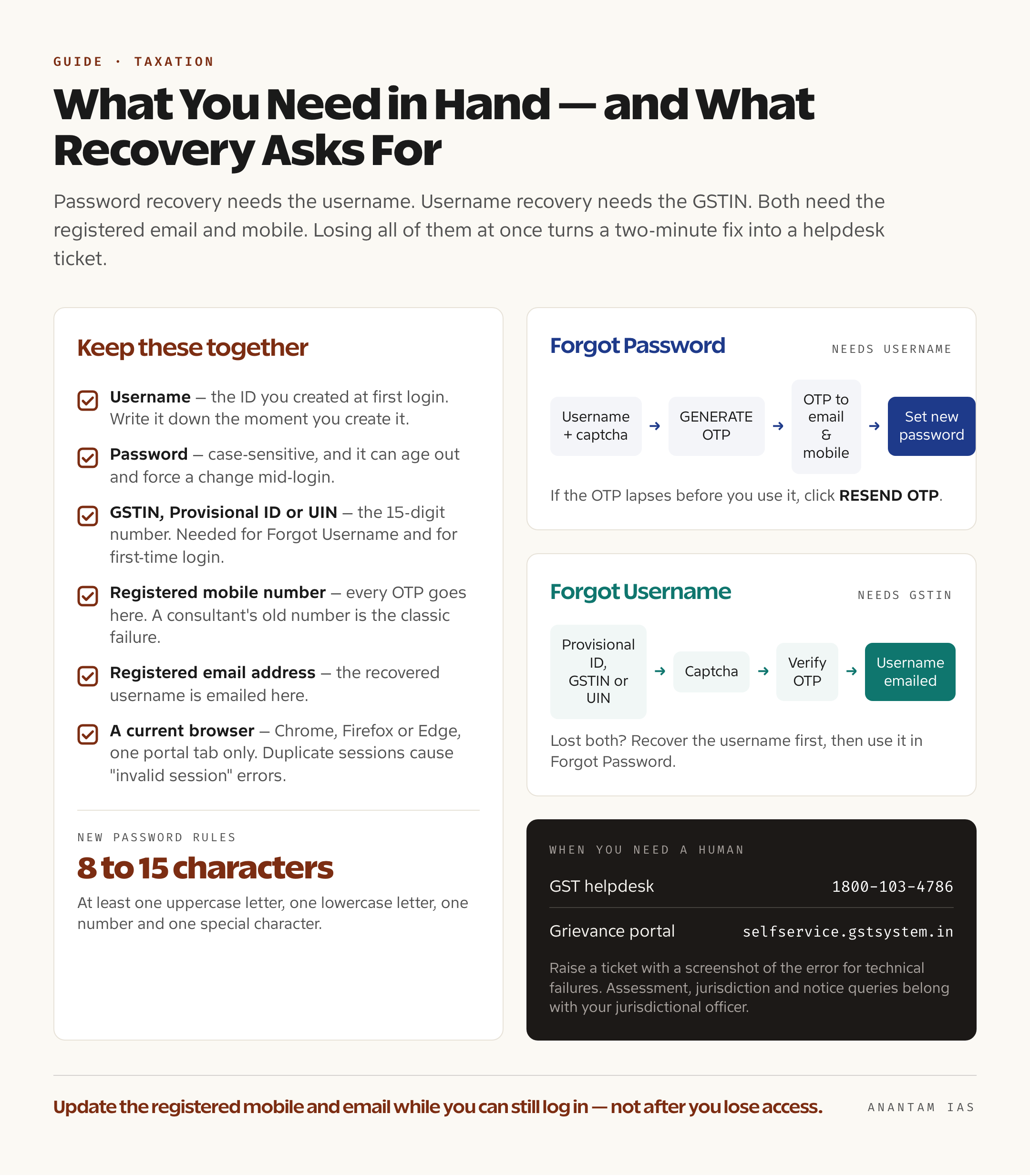
एक उपयोगी आदत है: username बनाते ही लिखकर रखें। Password recovery में username चाहिए और username recovery में GSTIN। दोनों एक साथ खो जाएँ तो दो मिनट का काम helpdesk ticket बन जाता है।
पहली बार registration
Credentials बिल्कुल नहीं हैं तो login page गलत door है। Portal पर Services > Registration > New Registration से registration होता है और इसके दो हिस्से हैं।
Part A में taxpayer type, state और district, PAN पर दर्ज business का exact legal name, PAN, email और mobile number भरते हैं। Email और mobile दोनों को अलग-अलग OTP से verify किया जाता है। यह पूरा होने पर portal Temporary Reference Number (TRN) देता है। TRN 15 दिन तक valid रहता है। इससे फिर login करके application पूरी करनी होती है।
Part B substantive form है। इसमें business constitution, promoters या directors और authorised signatory की details, address proof के साथ principal और additional places of business, HSN या SAC codes के साथ goods और services, bank account details, photographs और portal में माँगे गए format के supporting documents भरने होते हैं।
इसके बाद application verify करें। Proprietor, partnership, HUF और individual Aadhaar OTP से e-Sign या Electronic Verification Code के ज़रिए submit कर सकते हैं। Companies और LLPs को portal पर registered Digital Signature Certificate चाहिए।
Aadhaar authentication से तय होता है कि काम कितनी जल्दी होगा। Current rules में regular और composition applicants को authenticate करना होता है। Government departments, PSUs, local authorities और statutory bodies इस requirement से बाहर हैं। “Yes” चुनने पर authentication link आता है और common OTP उस Aadhaar के साथ UIDAI में registered mobile और email पर पहुँचता है। Risk assessment के आधार पर कुछ applicants को GST Suvidha Kendra में biometric verification के लिए भेजा जाता है। “No” चुनने वालों को भी photo capture और document verification के लिए Suvidha Kendra जाना पड़ता है।
Authentication सही हो जाए तो application जल्दी clear हो सकती है। इसे fail या skip किया तो file में mandatory site visit और officer scrutiny लगती है, तब जाकर आगे बढ़ती है।
Final submission पर email और SMS से Application Reference Number (ARN) मिलता है। Services > Registration > Track Application Status में इसे track करें। Officer query उठाए तो Form GST REG-03 में notice मिलेगा और बताई गई window में reply करना होगा। Approval के बाद GSTIN वाला certificate Form GST REG-06 में portal से download होगा और login credentials आगे मिलेंगे।
Dashboard पर मुख्य services
Dashboard summary screen है: profile completion, हाल की periods का return-filing status और आपके लिए pending notices या orders। असली काम top menu के अंदर है।
| Menu | यहाँ क्या कर सकते हैं |
|---|---|
| Dashboard | Profile snapshot, recent return status, notices और orders एक जगह |
| Services > Registration | Registration details amend करना, cancellation के लिए apply करना, cancellation revoke करना, composition में opt in या out करना |
| Services > Ledgers | Electronic cash ledger, credit ledger और liability register, यानी paid रकम और held credit का running account |
| Services > Returns | GSTR-1, GSTR-3B, annual return और reconciliation statement file और view करना; suppliers ने क्या report किया, देखना |
| Services > Payments | Challan बनाना, net banking, UPI, card, NEFT या RTGS से payment, challan history देखना |
| Services > User Services | Registration certificate download करना, notices और orders देखना, replies file करना, HSN search करना, letter of undertaking submit करना |
| Services > Refunds | Refund application file करना और ARN से track करना |
| Search Taxpayer | GSTIN verify करना या PAN से taxpayer खोजना, यह बिना login भी उपलब्ध है |
हर महीने दो चीज़ें check करें, भले ही return file न कर रहे हों। पहला, notices और orders section। Department की communication यहीं serve होती है और reply की घड़ी notice पढ़ी हो या नहीं, शुरू हो जाती है। दूसरा, suppliers ने सच में क्या upload किया है, उसके सामने credit ledger देखें। उनकी तरफ से report न हुआ invoice आपकी तरफ blocked credit बन जाता है।
आम login problems और उनके हल
Password भूल गए। Login page पर Forgot Password click करें। Username और captcha डालकर GENERATE OTP click करें। OTP portal में registered email और mobile पर आएगा। OTP डालकर CONTINUE करें और नया password set करें। Password 8 से 15 characters का हो, जिसमें uppercase, lowercase, number और special character हो। OTP की मियाद निकल जाए तो RESEND OTP click करें।
Username भूल गए। Login button के नीचे Forgot Username click करें। Portal Provisional ID, GSTIN या UIN और captcha माँगेगा। OTP registered email और mobile पर आएगा। Verify करने के बाद username registered address पर email हो जाएगा।
OTP नहीं आया। पहले spam folder देखें और transactional SMS DND setting से block तो नहीं है, जाँचें। असली समस्या अक्सर यह होती है कि record में दिया mobile या email अब इस्तेमाल नहीं होता, जैसे former consultant ने business register किया हो। फिर retry नहीं, registration में contact details का non-core amendment करना होगा। बिल्कुल login न हो तो jurisdictional office की मदद लें।
Account locked। बार-बार गलत password डालने पर account थोड़ी देर के लिए lock हो जाता है। Login पर hammer करने के बजाय इंतज़ार करें और फिर Forgot Password route लें।
Captcha बार-बार reject हो रहा है। Image refresh करें। उसे घूरते रहने के बजाय autofill extension बंद करें, जो field में गलत text भर सकती है।
Digital signature नहीं दिख रही। DSC signing के लिए emSigner utility उसी machine पर चलनी चाहिए, supported browser इस्तेमाल होना चाहिए और token लगा होना चाहिए। Utility restart करें, firewall में local port की अनुमति दें और fresh browser session आज़माएँ।
Pages अजीब खुलती हैं या form submit नहीं होता। Chrome, Firefox या Edge का current version इस्तेमाल करें। Site का cache और cookies साफ़ करें, aggressive ad-blockers बंद करें और portal की दो tabs एक साथ न खोलें। Duplicate session “invalid session” error का आम, लेकिन अक्सर न पहचाना गया कारण है।
कब किसी व्यक्ति से मदद लें। Portal की contact page पर GST helpdesk number 1800-103-4786 है। लिखित record चाहिए तो GST का Grievance Redressal Portal selfservice.gstsystem.in इस्तेमाल करें। Ticket raise करें, error का screenshot लगाएँ और ticket number से resolution track करें। Technical problem में यह बेहतर पहला कदम है। Assessment, jurisdiction या किसी specific notice का सवाल jurisdictional officer के पास जाएगा, helpdesk के पास नहीं।
सामान्य प्रश्न
क्या GSTIN और GST portal username एक ही हैं? नहीं। GSTIN आपका 15-digit registration number है, जो invoices पर छपा और public दिखाई देता है। Username वह private ID है जिसे first login पर आपने बनाया था और login box में वही चाहिए। GSTIN केवल Forgot Username और first-time login flow में इस्तेमाल होता है।
Username और password दोनों भूल गया हूँ। अब क्या करूँ? पहले Forgot Username में GSTIN देकर username recover करें। यह registered email पर आएगा। फिर उसी username से Forgot Password करें। दोनों steps के लिए registered email और mobile की पहुँच चाहिए। वे पुराने हों तो पहले details update कराएँ।
GST account से जुड़े mobile और email बदल सकता हूँ? हाँ। Portal पर registration के non-core amendment से दोनों बदल सकते हैं और officer approval नहीं चाहिए। Login करके ऐसा करें। Access खोने के बाद बदलना मुश्किल होगा।
एक GST login कितने लोग इस्तेमाल कर सकते हैं? Primary credentials authorised signatory के पास रहते हैं। Registered taxpayers User Management के तहत limited rights वाले sub-users बना सकते हैं। Accountant, consultant और clerk के साथ password share करने से यह कहीं सुरक्षित है। Main account को प्रभावित किए बिना sub-user access वापस लिया जा सकता है।
क्या login के लिए official GST mobile app है? GST system की filing services browser-based हैं। Portal username और password माँगने वाली third-party app को risk मानें। ऐसे software को credentials देने से returns, ledgers और refunds किसी और के हाथ में जा सकते हैं।
“GST registration” वाली website fake है, यह कैसे पता चले? Government portal www.gst.gov.in है और कुछ नहीं। Registration मुफ़्त है। Instant GSTIN की फीस, login credentials या government-style logos वाले search ads private intermediaries हैं।