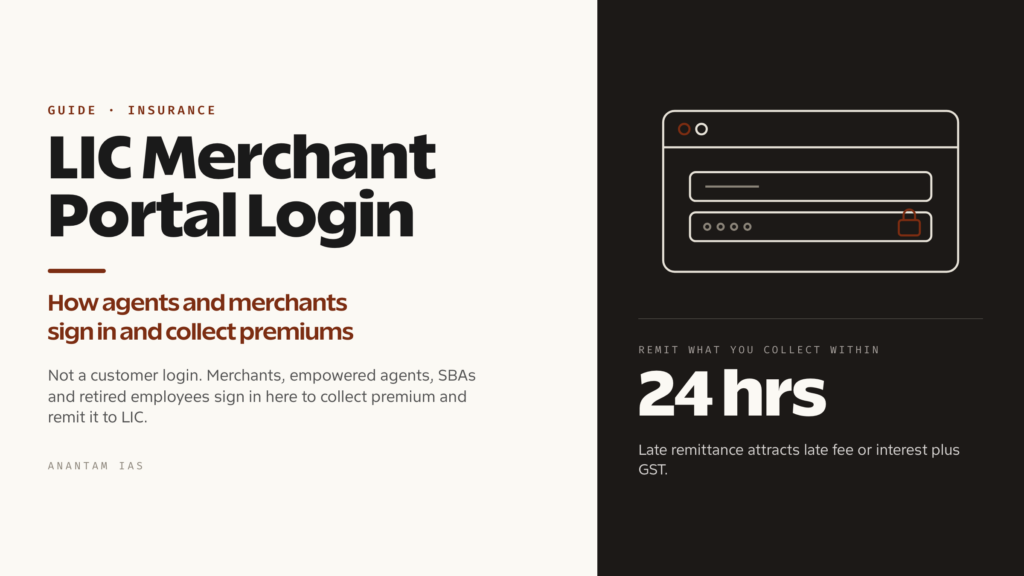
किसी छोटी दुकान पर LIC का signboard देखकर renewal premium cash में दें और जो receipt मिले, वह एक portal से छपी होती है। Counter के पीछे बैठा व्यक्ति authorised LIC merchant है और जिस software में वह logged in है, वह LIC Merchant Portal है। Agents, premium points और दूसरे authorised collectors policyholders से पैसा लेने और Corporation को उसका हिसाब देने के लिए यही system इस्तेमाल करते हैं।
यह customer login नहीं है। Policyholder खुद का premium भरना चाहता है तो यह गलत door है। लेकिन अगर आप LIC agent, CLIA, SBA, retired employee या premium point चलाने वाले merchant हैं तो यही आपका working login है। यह guide portal, sign in, first-time setup, collection dashboard और password काम न करने पर क्या करें, यह सब बताती है।
LIC Merchant Portal क्या है और किसे इस्तेमाल करना चाहिए
Merchant Portal Life Insurance Corporation of India का authorised field intermediaries के लिए premium collection system है। Landing page पर साफ़ लिखा है: “Merchants / Empowered Agents / SBAs / Retired Employees Login — Premium Collections.” एक line में यही eligibility list है। Access LIC authorised लोगों को देती है। Shopping site की तरह कोई self-registration नहीं है।
Safe route से जाएँ। licindia.in खोलें और site के अपने portals menu से Merchant Portal का link चुनें। इससे merchant.licindia.in/merchant/ खुलेगा। LIC address खुद type करके link follow करना search result पर भरोसा करने से बेहतर है, क्योंकि premium collection credentials valuable target हैं।
LIC इस system को rebuilt platform पर ले जा रहा है। Merchant home page पर New Collections Portal pay.licindia.in का prominent link है। यह खुद को “New Merchant Portal — Simplifying Collections, Empowering Merchants” कहता है और इसका अपना login, FAQ, announcements, video tutorials, user manual तथा ticket-raising links हैं। Transition के दौरान दोनों addresses चल सकते हैं। Merchant home page इस समय जिस पर भेजे, वही follow करें।
दो चीज़ें अलग रखें। Agent Portal agency business, servicing, business figures और proposals के लिए अलग system है। Merchant Portal खास तौर पर money collection के लिए है। दूसरा, LIC website की public Premium Point directory policyholder को अपने राज्य, district और tahsil में authorised collector ढूँढ़ने देती है। उसमें merchant names, codes और contacts होते हैं। यही arrangement का customer-facing हिस्सा है।
Login कैसे करें, चरण-दर-चरण
आपको जिस portal पर भेजा गया है, उसके अनुसार दो login screens में से एक खुलेगी। दोनों के steps छोटे हैं।
पुराने Merchant Portal पर:
- licindia.in खोलें और Merchant Portal का link follow करें, या सीधे merchant.licindia.in/merchant/ जाएँ।
- Page पर submit या login button click करें। इससे LIC portal login screen खुलेगी।
- अपना UserName डालें। यह LIC द्वारा जारी ID है।
- Password डालें। यह case-sensitive है और login page भी यही साफ़ कहता है।
- Box के ऊपर दिख रहा छोटा verification question हल करें। LIC distorted image के बजाय plain-language challenge देती है, जैसे screen पर दिख रही संख्या का आखिरी digit बताना, फिर reCAPTCHA check होता है।
- Submit करें।
Box के नीचे तीन links हैं जिनकी ज़रूरत कभी न कभी पड़ेगी: Change Password, Forgot Password और Update Email Id to get OTP।
pay.licindia.in वाले New Collections Portal पर:
- pay.licindia.in खोलें और Proceed to Login click करें।
- Login screen पर identifier डालें। Field में User Id, email ID, mobile number या SR number चल सकता है।
- Password डालकर continue करें।
- Account में second factor हो तो उसे पूरा करें। Portal authenticator-app verification support करता है और Google Authenticator login guide भी देता है।
Login button के साथ Reset Password / Authenticator और Forgot Password links भी हैं।
इस system के तीन नियम याद रखें, क्योंकि इनसे किसी वास्तविक outage से ज़्यादा बार “portal down है” वाली घबराहट होती है।
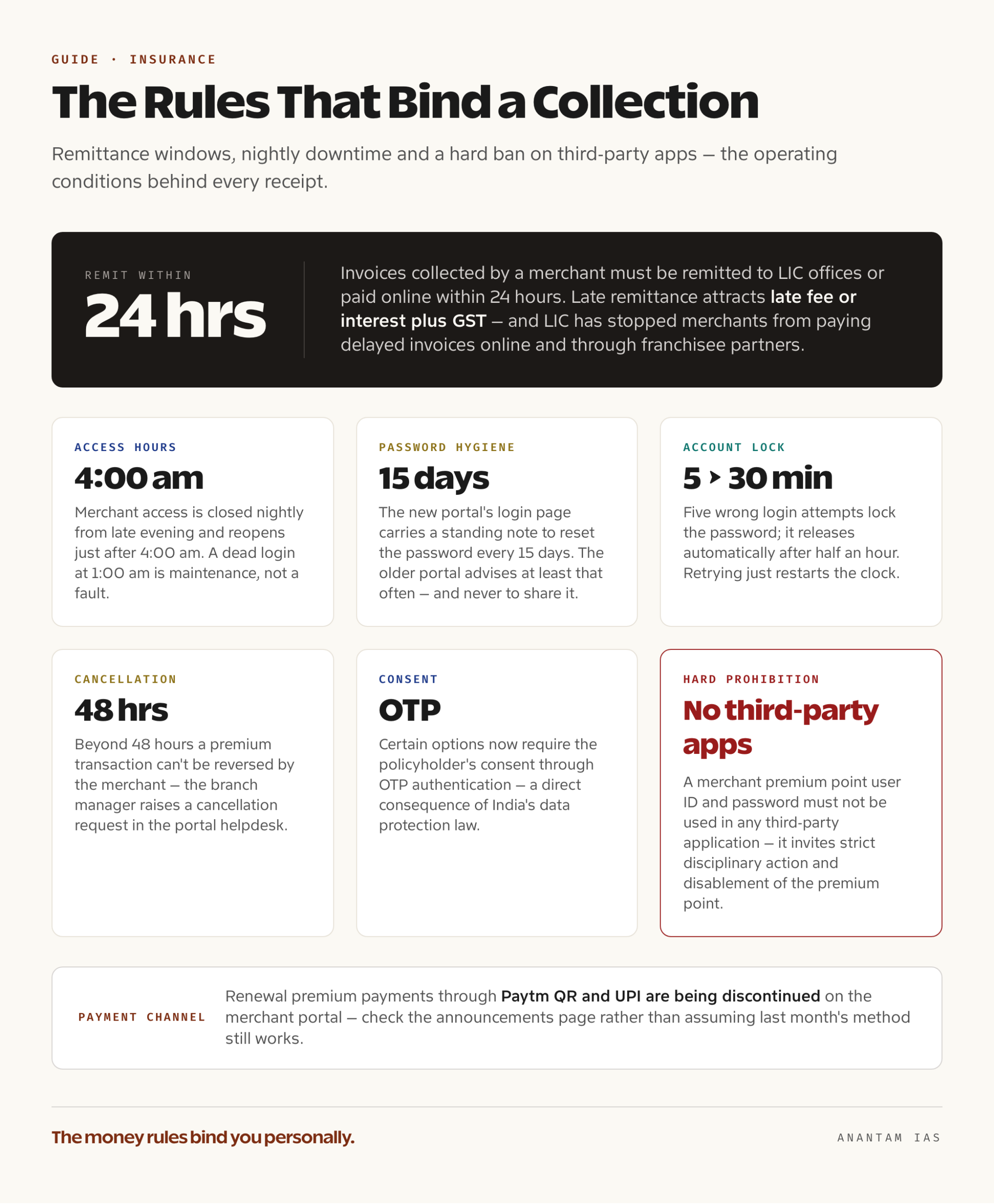
Portal चौबीस घंटे खुला नहीं रहता। LIC रात में merchant application access बंद करती है। Notices में देर शाम से सुबह 4:00 am के कुछ बाद तक nightly window दी गई है। रात 1:00 am पर dead login दिखे तो वजह यही हो सकती है।
Credentials को कभी third-party app में न डालें। LIC notices साफ़ कहते हैं कि merchant premium point user ID और password किसी third-party application में इस्तेमाल नहीं होने चाहिए। ऐसा करने पर strict disciplinary action, premium point disablement और Corporation के rules के तहत penalties हो सकती हैं। LIC की अपनी apps उसके अपने domains से आती हैं।
Password अक्सर बदलें। New portal के login page पर हर 15 दिन में password reset करने की standing note है। Old portal भी कम-से-कम इतनी बार password बदलने और किसी से share न करने को कहता है।
पहली बार registration और setup
Public sign-up form नहीं है। Merchant Portal का access authorisation के बाद मिलता है और authorisation LIC देती है।
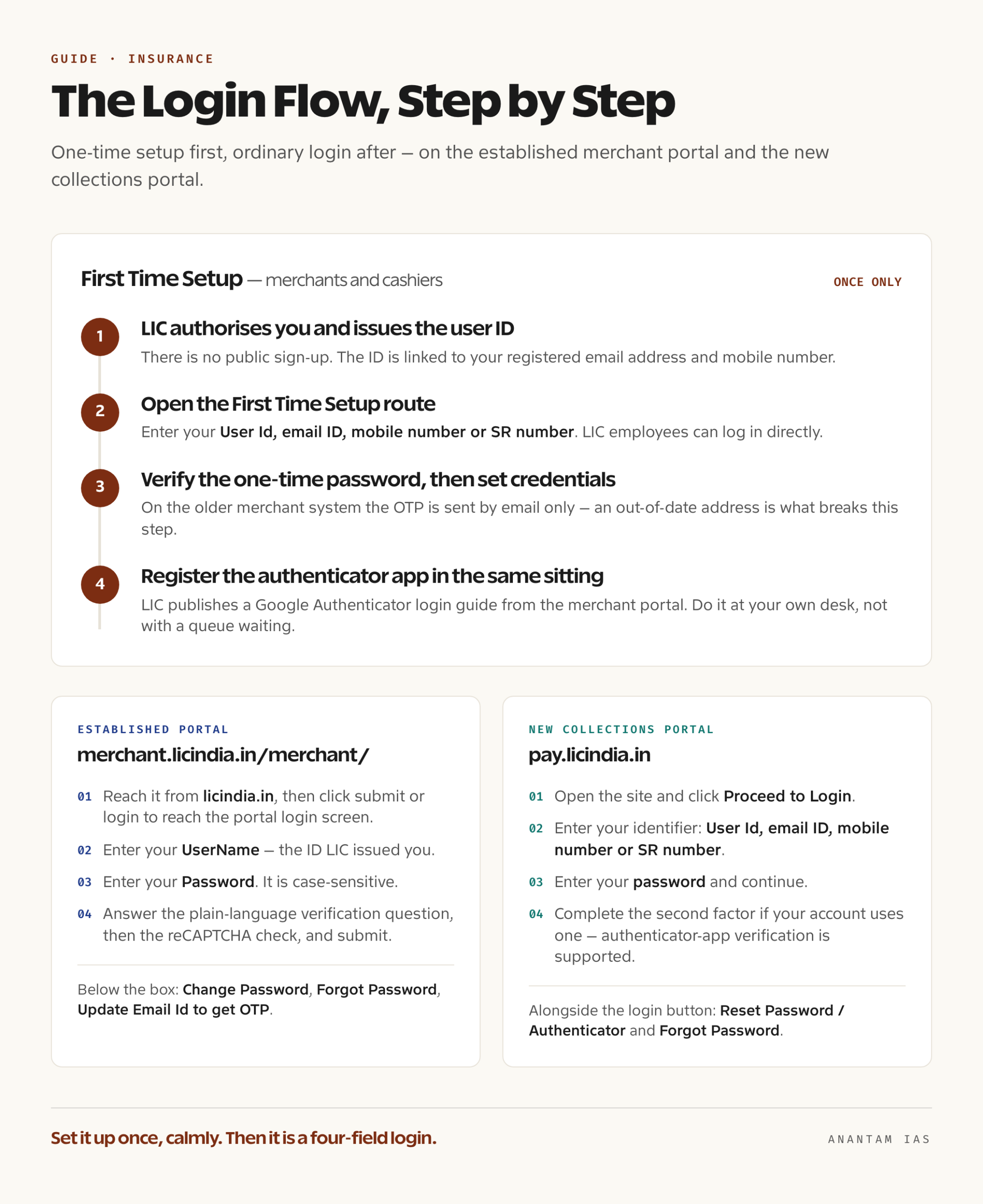
Step one: authorisation. आपको उन categories में पहले से होना चाहिए जिन्हें portal serve करता है: premium collection के लिए empowered LIC agent, CLIA, SBA, retired employee या premium point चलाने के लिए approved merchant। LIC agent बनना branch या divisional office के ज़रिए अलग process है। Agency code से पहले insurance regulator की training और examination requirements पूरी करनी होती हैं। Premium collect करने की permission अलग approval है, जो servicing office देता है और जिसमें cash collection limit जैसी operational conditions होती हैं। Limit पर सवाल हो तो अपने office के ज़रिए Central Office CLIA department से पूछें।
Step two: portal credential. LIC approval के बाद Corporation collection system की user ID जारी करती है और उसे registered email तथा mobile से जोड़ती है। ये contact details सजावटी नहीं हैं। पूरी recovery इन्हीं पर चलती है। Old portal में June 2020 से standing rule है कि one-time passwords केवल email से भेजे जाते हैं।
Step three: one-time setup. New collections portal में First Time Setup route है, जो merchants और cashiers के लिए है। LIC employees सीधे login कर सकते हैं। Setup screen पर User Id, email ID, mobile number या SR number देना होता है। One-time password आता है, उसे verify करके process पूरा करें और credentials set करें। इसके बाद ordinary login इस्तेमाल होगा।
Step four: authenticator. Account में authenticator हो तो उसी समय app set up कर लें। LIC merchant portal से Google Authenticator login guide देती है और बाद में authenticator फिर register करने के लिए login page के reset-password route पर भेजती है। Policyholders की queue के बीच करने से बेहतर है कि इसे अपनी desk पर शांति से पूरा कर लें।
पहली रकम लेने से पहले portal के user guide और instructions pages में operating conditions पढ़ें। Money rules आपकी personal responsibility हैं। Collected invoices को LIC offices में remit करना या 24 hours के भीतर online pay करना होता है। Late remittance पर late fee या interest और GST लगता है। LIC ने delayed invoices के online और franchisee partners के ज़रिए payment channels भी बंद किए हैं। यानी देर करने पर केवल पैसा नहीं, convenient payment channel भी खोता है।
Dashboard पर मुख्य services
यह portal browsing experience नहीं, working till है। मोटे तौर पर इसके अंदर ये काम होते हैं।
| क्षेत्र | क्या करता है |
|---|---|
| Premium collection | Policy खोजें, policyholder से renewal premium लें और वहीं receipt जारी करें |
| Invoicing | Collected रकम की invoice बनाकर तय window में LIC को remit करें |
| Invoice adjustment | Payment की कोशिश हुई, पैसा कट गया लेकिन confirmation नहीं आया, तो Invoicing tab में Invoice Adjustment option से मामला ठीक करें |
| NEFT registration status | Collection के समय देखें कि policyholder की bank details LIC में registered हैं या नहीं, ताकि उन्हें update कराया जा सके |
| Transaction records | Collections, जारी receipts और उनकी status देखें |
| i-Proposal and forms | Proposal tools और portal से linked standard LIC forms खोलें |
| Support | User guide, instructions, FAQs और ticket raise करना |
LIC की announcements से दो operational बातें अभी खास हैं। कुछ options में policyholder की OTP authentication के ज़रिए consent ज़रूरी है। यह India के data-protection law का सीधा असर है। इसलिए जिस काम को पहले अकेले करते थे, उसमें customer को सामने और reachable रखना पड़ सकता है। दूसरी, Corporation ने बताया है कि late June 2026 से merchant portal पर Paytm QR और UPI से renewal premium payment बंद की जा रही है। पिछले महीने का payment method अब चलता रहेगा, ऐसा न मानें। Announcements page देखें।
Cancellation की भी time limit है। 48 hours के बाद merchant premium transaction reverse नहीं कर सकता। Branch manager को portal helpdesk में cancellation request उठानी होगी।
आम login problems और उनके हल
Password सही होने पर भी reject हो रहा है। Password case-sensitive है। Caps lock और बदला हुआ keyboard layout जाँचें। यही सबसे आम वजह है।
Account locked। पाँच गलत login attempts के बाद portal password lock कर देता है और करीब आधे घंटे बाद अपने-आप unlock होता है। बार-बार retry करने के बजाय इंतज़ार करें। हर retry clock फिर शुरू कर देती है।
Password भूल गए। Login page का Forgot Password link लें। New collections portal पर इसी area में Reset Password / Authenticator भी है। Old portal का self-service रास्ता काम न करे तो LIC की guidance के अनुसार registered email से Corporation के agency departments को password reset request भेजें। Agent CLIA department address पर और SBA agency department address पर भेजें, जो portal पर दिया है। Mail में user ID और agency या merchant code दें, और कुछ नहीं।
OTP नहीं आया। Old merchant system में June 2020 से OTP केवल email पर जाते हैं। इसलिए phone का शांत रहना problem नहीं, outdated email address हो सकता है। Login page का Update Email Id to get OTP link इसी काम के लिए है। Ticket उठाने से पहले spam और mailbox-full condition जाँचें।
Authenticator खो गया या phone बदल गया। LIC announcements login page के reset-password route पर भेजती हैं। वहाँ Google Authenticator option चुनकर app फिर register करें। Portal FAQ में password और two-factor resets का अलग section है। Call करने से पहले उसे पढ़ लें।
रात में login बंद है। LIC की nightly maintenance window में merchant access बंद रहता है और सुबह 4:00 am के कुछ बाद खुलता है। Collections का plan इसके आसपास बनायें।
Payment लिया लेकिन confirmation नहीं आया। दोबारा payment collect न करें और अपने-आप ठीक होने का इंतज़ार न करें। Invoicing tab में Invoice Adjustment option लें। LIC ने यही case संभालने के लिए इसे दिया है।
कहाँ escalate करें। New collections portal पर support number 022-67090501 / 502 और helpdesk तथा ticket sections हैं। Old merchant portal technical issues को home page से linked LIC customer-service ticket system में भेजता है। Authorisation, collection limit या disputed remittance जैसे non-technical मामलों में servicing branch या divisional office सही जगह है, technical helpdesk नहीं।
सामान्य प्रश्न
क्या policyholder अपना premium भरने के लिए LIC Merchant Portal इस्तेमाल कर सकता है? नहीं। यह authorised merchants, agents, SBAs और retired employees के लिए है जो LIC की ओर से premium collect करते हैं। Policyholder LIC customer portal, licindia.in के payment pages, branch या LIC की public directory में listed authorised premium point से payment कर सकता है।
क्या Merchant Portal और LIC Agent Portal एक ही हैं? नहीं। दोनों अलग addresses पर अलग systems हैं। Agent Portal agency business और servicing संभालता है। Merchant Portal premium collection और invoicing के लिए है। Collection के लिए empowered agent के पास दोनों के credentials हो सकते हैं।
अपने पास authorised LIC premium point कैसे ढूँढ़ूँ? LIC website licindia.in पर Premium Point directory देती है। State, district और tahsil से filter कर सकते हैं। Merchant name, code और contact details मिलते हैं। Collector सच में authorised है या नहीं, यह confirm करने का भी यही तरीका है।
Collected रकम remit करने के लिए कितना समय है? Merchant द्वारा बनाई गई invoices LIC office में जमा या online 24 hours के भीतर paid होनी चाहिए। देर पर late fee या interest और GST लगता है। LIC ने delayed invoices के online और franchisee payment channels हटा दिए हैं, इसलिए late invoice settle करना महँगा और मुश्किल दोनों है।
देर रात login क्यों नहीं होता? Merchant access हर दिन late evening से सुबह 4:00 am के कुछ बाद तक nightly window में जानबूझकर बंद रहता है। यह maintenance है, account fault नहीं।
क्या तेज़ LIC premium collection screen देने वाली third-party app इस्तेमाल कर सकता हूँ? नहीं। LIC notices में साफ़ है कि merchant premium point user ID और password किसी third-party application में इस्तेमाल नहीं करने हैं। ऐसा करने पर strict disciplinary action, premium point disablement और data-privacy तथा security rules के तहत penalties हो सकती हैं। LIC अपने domains से जो apps दे, केवल वही इस्तेमाल करें।