

Walk into a small shop with an LIC signboard and hand over a renewal premium in cash, and the receipt you get is printed off a portal. The person behind the counter is an authorised LIC merchant, and the software they’re logged into is the LIC Merchant Portal — the system through which agents, premium points and other authorised collectors take money from policyholders and account for it to the Corporation.
It is not a customer login. If you’re a policyholder wanting to pay your own premium, this is the wrong door. But if you are an LIC agent, a CLIA, an SBA, a retired employee or a merchant running a premium point, this is the login you live in, and this guide covers what it is, how to sign in, how the first-time setup works, what the collection dashboard does, and what to do when the password stops working.
What the LIC Merchant Portal Is and Who Should Use It
The Merchant Portal is Life Insurance Corporation of India’s premium collection system for its authorised field intermediaries. The landing page at merchant.licindia.in states plainly who it is for: “Merchants / Empowered Agents / SBAs / Retired Employees Login — Premium Collections.” That’s the eligibility list in one line. Access is granted by LIC to people it has authorised; you cannot self-register the way you would on a shopping site.
Reach it the safe way. Go to licindia.in, and the Merchant Portal is linked from the site’s own portals menu — it opens at merchant.licindia.in/merchant/. Typing the LIC address and following the link beats trusting a search result, because premium collection credentials are a high-value target.
LIC has been moving this system onto a rebuilt platform. The merchant home page carries a prominent link to a New Collections Portal at pay.licindia.in, which presents itself as the “New Merchant Portal — Simplifying Collections, Empowering Merchants” and carries its own login, FAQ, announcements, video tutorials, user manual and ticket-raising links. Expect both addresses to be in circulation while the transition runs, and follow whichever one the LIC merchant home page is currently pointing you to.
Two things to keep clear. First, the Agent Portal is a different system on a different address for agency business — servicing, business figures, proposals — while the Merchant Portal is specifically about collecting money. Second, the public Premium Point directory on the LIC website is where a policyholder finds a nearby authorised collector by state, district and tahsil, listing merchant names, codes and contacts. That directory is the customer-facing side of the same arrangement.
How to Log In, Step by Step
There are two login screens in play depending on which portal you’ve been directed to. Both are short.
On the established merchant portal:
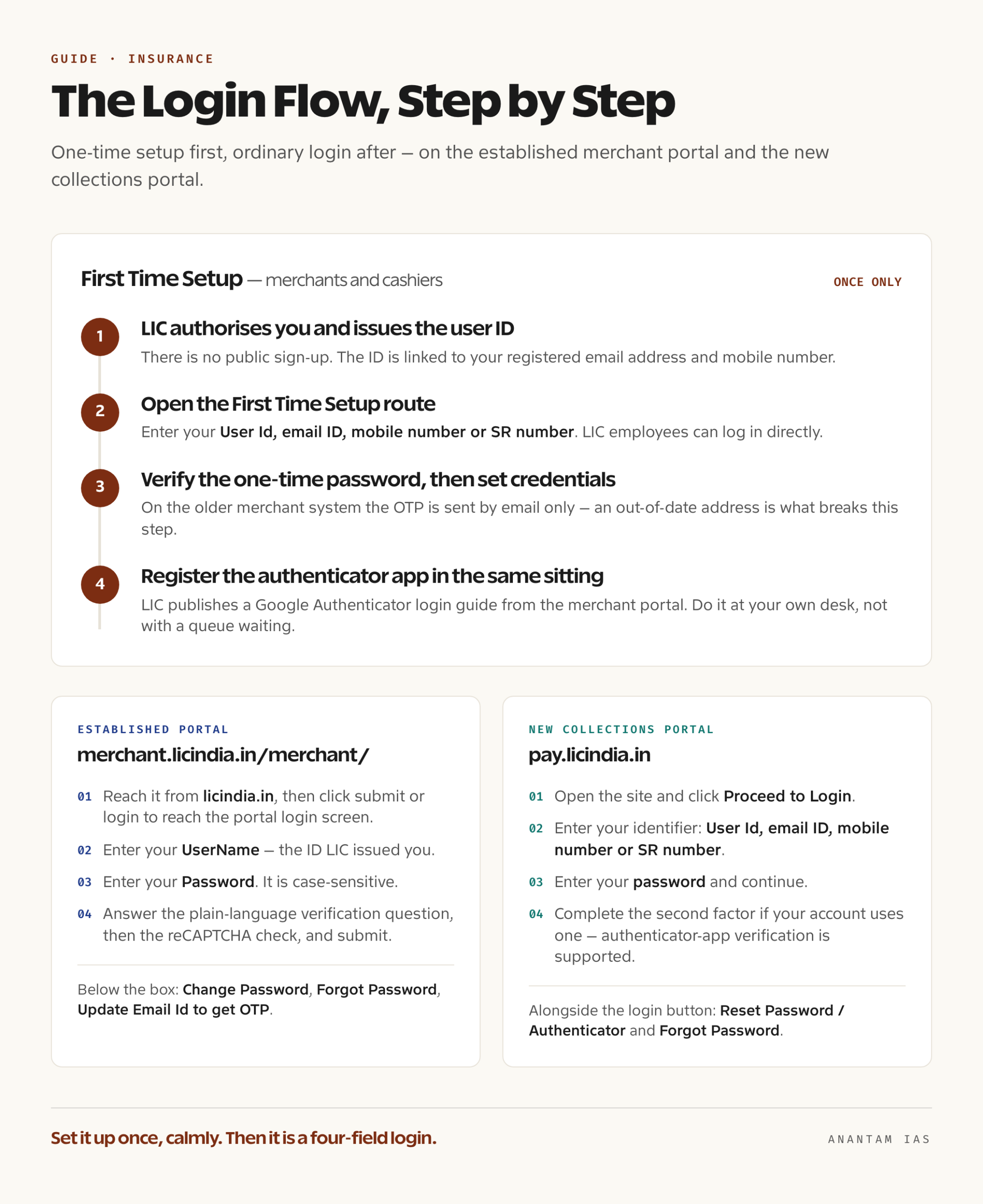
- Open licindia.in and follow the link to the Merchant Portal, or go directly to merchant.licindia.in/merchant/.
- Click the submit or login button on that page to reach the LIC portal login screen.
- Enter your UserName — the ID LIC issued you.
- Enter your Password. It is case-sensitive, and the login page says so explicitly.
- Answer the small verification question shown above the box. LIC uses a plain-language challenge rather than a distorted image — something on the lines of naming the last digit of a number displayed on screen — followed by a reCAPTCHA check.
- Submit.
Below the box sit three links you will need sooner or later: Change Password, Forgot Password, and Update Email Id to get OTP.
On the new collections portal at pay.licindia.in:
- Open pay.licindia.in and click Proceed to Login.
- On the login screen, enter your identifier. The field accepts User Id, email ID, mobile number or SR number.
- Enter your password and continue.
- Complete the second factor if your account uses one — the portal supports authenticator-app verification and publishes a Google Authenticator login guide.
Alongside the login button, that portal offers Reset Password / Authenticator and Forgot Password links.
Three rules on this system are worth memorising, because they cause more “the portal is down” panic than any actual outage.
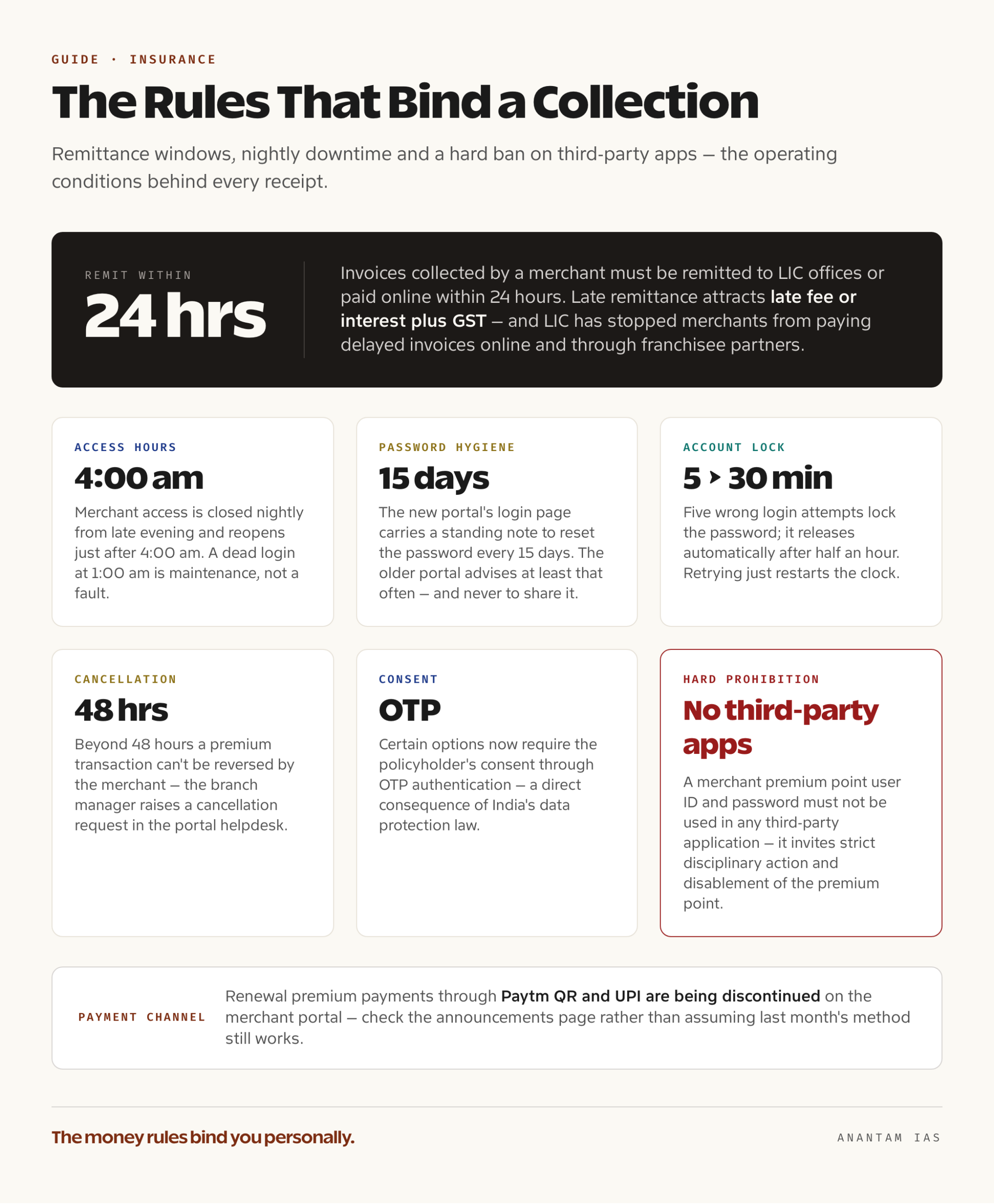
The portal is not open around the clock. LIC restricts merchant application access overnight — the notices give a nightly window from late evening to just after 4:00 am when merchant access is closed. If you’re staring at a dead login at 1:00 am, that’s why.
Never put these credentials into a third-party app. LIC’s notices are unambiguous: a merchant premium point user ID and password must not be used in any third-party application, and doing so invites strict disciplinary action and disablement of the premium point, with penalties under the Corporation’s rules. LIC’s own apps are distributed from its own domains.
Change the password often. The new portal’s login page carries a standing note to reset the password every 15 days, and the older portal advises merchants to change it at least that often and never to share it.
Registering for the First Time
There is no public sign-up form. Access to the Merchant Portal follows authorisation, and authorisation comes from LIC.
Step one is the authorisation itself. You have to already belong to one of the categories the portal serves — an LIC agent empowered for premium collection, a CLIA, an SBA, a retired employee, or a merchant approved to run a premium point. Becoming an LIC agent is its own process through a branch or divisional office, governed by the insurance regulator’s training and examination requirements before an agency code is issued. Permission to collect premium is a further, separate approval, granted by the servicing office and carrying operational conditions such as a cash collection limit. Queries about that limit go to the Central Office CLIA department through your own office.
Step two is the portal credential. Once LIC has approved you, the Corporation issues the user ID for the collection system and links it to your registered email address and mobile number. Those contact details are not decorative — the entire recovery mechanism runs through them, and the older portal has had a standing rule since June 2020 that one-time passwords are sent by email only.
Step three is the one-time setup. The new collections portal has a dedicated First Time Setup route, described on the site as being for merchants and cashiers, with LIC employees able to log in directly. That setup screen asks for your User Id, email ID, mobile number or SR number, sends a one-time password, and has you verify it before you finish the process and set your credentials. From then on you use the ordinary login.
Step four, if your account uses an authenticator. Set up the authenticator app in the same sitting. LIC publishes a Google Authenticator login guide from the merchant portal, and the announcements point at the login page’s reset-password route for re-registering an authenticator later. Doing it calmly at your own desk beats doing it with a queue of policyholders waiting.
Before you take a single rupee, read the operating conditions in the user guide and instructions pages the portal links. The money rules bind you personally: invoices collected must be remitted to LIC offices or paid online within 24 hours, and late remittance attracts late fee or interest plus GST. LIC has also stopped merchants from paying delayed invoices online and through franchisee partners, so a delay doesn’t just cost money, it costs you the convenient payment channel.
Key Services on the Dashboard
The portal is a working till, not a browsing experience. Broadly, this is what sits inside.
| Area | What it does |
|---|---|
| Premium collection | Look up a policy, collect renewal premium from the policyholder and issue a receipt on the spot |
| Invoicing | Generate the invoice for what you’ve collected and remit it to LIC within the prescribed window |
| Invoice adjustment | Resolve cases where a payment was attempted, money was deducted, but confirmation didn’t come back — handled through the Invoice Adjustment option under the Invoicing tab |
| NEFT registration status | See at the point of collection whether the policyholder’s bank details are registered with LIC, so you can get them updated |
| Transaction records | Review collections made, receipts issued and their status |
| i-Proposal and forms | Access proposal-related tools and standard LIC forms linked from the portal |
| Support | User guide, instructions, FAQs and ticket raising |
Two operational notes from LIC’s own announcements are current and consequential. Certain options now require the policyholder’s consent through OTP authentication, a direct consequence of India’s data protection law — so you may need the customer present and reachable for actions you once did alone. And the Corporation has announced that renewal premium payments through Paytm QR and UPI are being discontinued on the merchant portal from late June 2026, which changes how some premium points have been taking money at the counter. Check the announcements page rather than assuming last month’s payment method still works.
Cancellation has a clock on it too. Beyond 48 hours, a premium transaction can’t be reversed by the merchant — the branch manager has to raise a cancellation request in the portal helpdesk.
Common Login Problems and How to Fix Them
Password rejected even though you’re sure it’s right. The password is case-sensitive; check the caps lock and any keyboard layout you’ve switched. It’s the single most common cause.
Account locked. The portal locks the password after five wrong login attempts, and it releases automatically after half an hour. Waiting is the fix. Repeatedly retrying just restarts the clock.
Forgot password. Use the Forgot Password link on the login page. On the new collections portal, the same area offers Reset Password / Authenticator. Where the older portal’s self-service route doesn’t resolve it, LIC’s own guidance has been that a password reset request goes by email to the Corporation’s agency departments — from agents to the CLIA department address and from SBAs to the agency department address published on the portal. Send it from your registered email, with your user ID and agency or merchant code, and nothing else.
No OTP arriving. On the older merchant system, one-time passwords are sent by email only, and have been since June 2020 — so a silent phone is not the problem, an out-of-date email address is. That’s exactly what the Update Email Id to get OTP link on the login page exists for. Check spam and any mailbox-full condition before raising a ticket.
Authenticator lost, phone replaced. LIC’s announcements point to the login page’s reset-password route, where you select the Google Authenticator option to re-register the app. The portal’s FAQ has a dedicated section on password and two-factor resets, and it’s worth reading before you call anyone.
Login dead at night. Merchant access is closed during LIC’s nightly maintenance window and reopens just after 4:00 am. Plan collections around it.
Payment taken but not confirmed. Don’t collect twice and don’t assume it will sort itself out. Use the Invoice Adjustment option under the Invoicing tab, which is precisely what LIC has provided it for.
Where to escalate. The new collections portal publishes a support number of 022-67090501 / 502 plus helpdesk and ticket-raising sections. The older merchant portal routes technical issues through LIC’s customer-service ticket system linked from its home page. For anything that isn’t technical — your authorisation, your collection limit, a disputed remittance — your servicing branch or divisional office is the right address, not the technical helpdesk.
FAQ
Can a policyholder use the LIC Merchant Portal to pay their own premium? No. This portal is for authorised merchants, agents, SBAs and retired employees collecting premium on LIC’s behalf. Policyholders pay through LIC’s customer portal, the payment pages on licindia.in, or in person at a branch or an authorised premium point listed in LIC’s public directory.
Is the Merchant Portal the same as the LIC Agent Portal? No. They are separate systems on separate addresses. The Agent Portal covers agency business and servicing; the Merchant Portal is the premium collection and invoicing system. An agent empowered for collection may have credentials for both.
How do I find an authorised LIC premium point near me? LIC publishes a Premium Point directory on licindia.in that you can filter by state, district and tahsil. It shows merchant names, merchant codes and contact details, which is also a way to confirm that a collector is genuinely authorised.
How long do I have to remit what I’ve collected? Invoices collected by a merchant are to be remitted to LIC offices or paid online within 24 hours. Delayed remittances attract late fee or interest plus GST, and LIC has withdrawn the online and franchisee payment channels for delayed invoices — so a late invoice becomes harder as well as costlier to settle.
Why can’t I log in late at night? Because merchant access is deliberately closed during a nightly window that runs from late evening until just after 4:00 am, every day. It’s maintenance, not a fault.
Can I use a third-party app that offers a faster LIC premium collection screen? No, and this is one to take seriously. LIC’s notices state that merchant premium point user IDs and passwords must not be used in any third-party application, and that doing so can lead to strict disciplinary action, disablement of the premium point, and penalties under data privacy and security rules. Use only the applications LIC distributes from its own domains.
Tell Google you want more of this.
Add Anantam IAS as a preferred sourceOne tap, and this site shows up more often in your own Top Stories, AI Overviews and AI Mode. Remove it any time.






